<!DOCTYPE html>
    <html lang="vi" xmlns="http://www.w3.org/1999/xhtml" prefix="og: http://ogp.me/ns#">
    <head>
<title>HỆ THỐNG CHUYÊN MÔN TRƯỜNG PÉTRUS KÝ</title>
<meta name="description" content="Thủ thuật giúp tăng tốc độ sao chép dữ liệu trên máy tính - Savefile - Tin Tức -...">
<meta name="author" content="HỆ THỐNG CHUYÊN MÔN TRƯỜNG PÉTRUS KÝ">
<meta name="copyright" content="HỆ THỐNG CHUYÊN MÔN TRƯỜNG PÉTRUS KÝ []">
<meta name="generator" content="NukeViet v4.5">
<meta name="viewport" content="width=device-width, initial-scale=1">
<meta http-equiv="Content-Type" content="text/html; charset=utf-8">
<meta property="og:title" content="Thủ thuật giúp tăng tốc độ sao chép dữ liệu trên máy tính">
<meta property="og:type" content="website">
<meta property="og:description" content="Savefile - Tin Tức - https&#x3A;&#x002F;&#x002F;cm.pek.edu.vn&#x002F;vi&#x002F;news&#x002F;savefile&#x002F;thong-tin-cong-nghe&#x002F;thu-thuat-giup-tang-toc-do-sao-chep-du-lieu-tren-may-tinh-244.html">
<meta property="og:site_name" content="HỆ THỐNG CHUYÊN MÔN TRƯỜNG PÉTRUS KÝ">
<meta property="og:url" content="https://cm.pek.edu.vn/vi/news/savefile/thong-tin-cong-nghe/thu-thuat-giup-tang-toc-do-sao-chep-du-lieu-tren-may-tinh-244.html">
<link rel="shortcut icon" href="https://cm.pek.edu.vn/uploads/favicon.ico">
<link rel="canonical" href="https://cm.pek.edu.vn/vi/news/savefile/thong-tin-cong-nghe/thu-thuat-giup-tang-toc-do-sao-chep-du-lieu-tren-may-tinh-244.html">
<link rel="alternate" href="https://cm.pek.edu.vn/vi/news/rss/" title="Tin Tức" type="application/rss+xml">
<link rel="alternate" href="https://cm.pek.edu.vn/vi/news/rss/ke-hoach-lam-viec/" title="Tin Tức - Kế hoạch làm việc" type="application/rss+xml">
<link rel="alternate" href="https://cm.pek.edu.vn/vi/news/rss/ke-hoach-lam-viec-tieu-hoc/" title="Tin Tức - Kế hoạch làm việc Tiểu học" type="application/rss+xml">
<link rel="alternate" href="https://cm.pek.edu.vn/vi/news/rss/thong-bao-chuyen-mon/" title="Tin Tức - Thông báo chuyên môn" type="application/rss+xml">
<link rel="alternate" href="https://cm.pek.edu.vn/vi/news/rss/thong-bao-chuyen-mon-tieu-hoc/" title="Tin Tức - Thông báo chuyên môn Tiểu học" type="application/rss+xml">
<link rel="alternate" href="https://cm.pek.edu.vn/vi/news/rss/hoat-dong-chuyen-mon-trai-nghiem/" title="Tin Tức - Hoạt động trải nghiệm-sáng tạo" type="application/rss+xml">
<link rel="alternate" href="https://cm.pek.edu.vn/vi/news/rss/tai-lieu-huong-dan/" title="Tin Tức - Tài liệu hướng dẫn" type="application/rss+xml">
<link rel="alternate" href="https://cm.pek.edu.vn/vi/news/rss/tu-lieu-giao-duc/" title="Tin Tức - Tư liệu giáo dục" type="application/rss+xml">
<link rel="alternate" href="https://cm.pek.edu.vn/vi/news/rss/tai-lieu-giang-day-tap-huan/" title="Tin Tức - Tài liệu giảng dạy-tập huấn" type="application/rss+xml">
<link rel="alternate" href="https://cm.pek.edu.vn/vi/news/rss/de-thi-cap-truong/" title="Tin Tức - Đề thi cấp trường" type="application/rss+xml">
<link rel="alternate" href="https://cm.pek.edu.vn/vi/news/rss/de-thi-nam-2019-2020/" title="Tin Tức - 2019-2020" type="application/rss+xml">
<link rel="alternate" href="https://cm.pek.edu.vn/vi/news/rss/2020-2021/" title="Tin Tức - 2020-2021" type="application/rss+xml">
<link rel="alternate" href="https://cm.pek.edu.vn/vi/news/rss/de-thi-hoc-ky-1/" title="Tin Tức - Đề thi học kỳ 1" type="application/rss+xml">
<link rel="alternate" href="https://cm.pek.edu.vn/vi/news/rss/de-thi-hoc-ky-2/" title="Tin Tức - Đề thi học kỳ 2" type="application/rss+xml">
<link rel="alternate" href="https://cm.pek.edu.vn/vi/news/rss/2021-2022/" title="Tin Tức - 2021-2022" type="application/rss+xml">
<link rel="alternate" href="https://cm.pek.edu.vn/vi/news/rss/de-thi-hsg-cap-huyen-thanh-pho/" title="Tin Tức - Đề thi cấp TP" type="application/rss+xml">
<link rel="alternate" href="https://cm.pek.edu.vn/vi/news/rss/de-thi-cap-tinh-thanh-pho/" title="Tin Tức - Đề thi cấp tỉnh" type="application/rss+xml">
<link rel="alternate" href="https://cm.pek.edu.vn/vi/news/rss/de-thi-cap-quoc-gia/" title="Tin Tức - Đề thi cấp QG" type="application/rss+xml">
<link rel="alternate" href="https://cm.pek.edu.vn/vi/news/rss/van-ban-hanh-chinh/" title="Tin Tức - Văn bản hành chính" type="application/rss+xml">
<link rel="alternate" href="https://cm.pek.edu.vn/vi/news/rss/van-ban-petrus-ky/" title="Tin Tức - Văn bản trường" type="application/rss+xml">
<link rel="alternate" href="https://cm.pek.edu.vn/vi/news/rss/vb-phong-gddt/" title="Tin Tức - Văn bản PGD" type="application/rss+xml">
<link rel="alternate" href="https://cm.pek.edu.vn/vi/news/rss/vb-so-gddt/" title="Tin Tức - Văn bản SGD" type="application/rss+xml">
<link rel="alternate" href="https://cm.pek.edu.vn/vi/news/rss/van-ban-bo-gddt/" title="Tin Tức - VB Bộ GDĐT" type="application/rss+xml">
<link rel="alternate" href="https://cm.pek.edu.vn/vi/news/rss/dien-dan-giao-duc/" title="Tin Tức - Diễn đàn giáo dục" type="application/rss+xml">
<link rel="alternate" href="https://cm.pek.edu.vn/vi/news/rss/infographics/" title="Tin Tức - Infographics" type="application/rss+xml">
<link rel="alternate" href="https://cm.pek.edu.vn/vi/news/rss/thong-tin-cong-nghe/" title="Tin Tức - Thông tin công nghệ" type="application/rss+xml">
<link rel="alternate" href="https://cm.pek.edu.vn/vi/news/rss/bieu-mau-noi-bo/" title="Tin Tức - Biểu mẫu nội bộ" type="application/rss+xml">
<link rel="alternate" href="https://cm.pek.edu.vn/vi/news/rss/phan-mem-bao-mat/" title="Tin Tức - Phần mềm-bảo mật" type="application/rss+xml">
<link rel="alternate" href="https://cm.pek.edu.vn/vi/news/rss/goc-nhin-giao-duc/" title="Tin Tức - Góc nhìn giáo dục" type="application/rss+xml">
<link rel="alternate" href="https://cm.pek.edu.vn/vi/news/rss/thi-tot-nghiep-va-tuyen-sinh/" title="Tin Tức - Thi tốt nghiệp và tuyển sinh" type="application/rss+xml">
<link rel="alternate" href="https://cm.pek.edu.vn/vi/news/rss/tin-tuc-trung-tam/" title="Tin Tức - Tin tức trung tâm Ngoại ngữ" type="application/rss+xml">
<link rel="alternate" href="https://cm.pek.edu.vn/vi/news/rss/bai-tap-online/" title="Tin Tức - Bài tập online" type="application/rss+xml">
<link rel="alternate" href="https://cm.pek.edu.vn/vi/news/rss/khoi-1/" title="Tin Tức - Khối 1" type="application/rss+xml">
<link rel="alternate" href="https://cm.pek.edu.vn/vi/news/rss/toan/" title="Tin Tức - Toán" type="application/rss+xml">
<link rel="alternate" href="https://cm.pek.edu.vn/vi/news/rss/tieng-viet/" title="Tin Tức - Tiếng Việt" type="application/rss+xml">
<link rel="alternate" href="https://cm.pek.edu.vn/vi/news/rss/tieng-anh/" title="Tin Tức - Tiếng Anh" type="application/rss+xml">
<link rel="alternate" href="https://cm.pek.edu.vn/vi/news/rss/khoi-2/" title="Tin Tức - Khối 2" type="application/rss+xml">
<link rel="alternate" href="https://cm.pek.edu.vn/vi/news/rss/toan-45/" title="Tin Tức - Toán" type="application/rss+xml">
<link rel="alternate" href="https://cm.pek.edu.vn/vi/news/rss/tieng-viet-46/" title="Tin Tức - Tiếng Việt" type="application/rss+xml">
<link rel="alternate" href="https://cm.pek.edu.vn/vi/news/rss/tieng-anh-47/" title="Tin Tức - Tiếng Anh" type="application/rss+xml">
<link rel="alternate" href="https://cm.pek.edu.vn/vi/news/rss/khoi-3/" title="Tin Tức - Khối 3" type="application/rss+xml">
<link rel="alternate" href="https://cm.pek.edu.vn/vi/news/rss/toan-48/" title="Tin Tức - Toán" type="application/rss+xml">
<link rel="alternate" href="https://cm.pek.edu.vn/vi/news/rss/tieng-viet-49/" title="Tin Tức - Tiếng Việt" type="application/rss+xml">
<link rel="alternate" href="https://cm.pek.edu.vn/vi/news/rss/tieng-anh-50/" title="Tin Tức - Tiếng Anh" type="application/rss+xml">
<link rel="alternate" href="https://cm.pek.edu.vn/vi/news/rss/khoi-4/" title="Tin Tức - Khối 4" type="application/rss+xml">
<link rel="alternate" href="https://cm.pek.edu.vn/vi/news/rss/toan-51/" title="Tin Tức - Toán" type="application/rss+xml">
<link rel="alternate" href="https://cm.pek.edu.vn/vi/news/rss/tieng-viet-52/" title="Tin Tức - Tiếng Việt" type="application/rss+xml">
<link rel="alternate" href="https://cm.pek.edu.vn/vi/news/rss/tieng-anh-53/" title="Tin Tức - Tiếng Anh" type="application/rss+xml">
<link rel="alternate" href="https://cm.pek.edu.vn/vi/news/rss/khoi-5/" title="Tin Tức - Khối 5" type="application/rss+xml">
<link rel="alternate" href="https://cm.pek.edu.vn/vi/news/rss/toan-54/" title="Tin Tức - Toán" type="application/rss+xml">
<link rel="alternate" href="https://cm.pek.edu.vn/vi/news/rss/tieng-viet-55/" title="Tin Tức - Tiếng Việt" type="application/rss+xml">
<link rel="alternate" href="https://cm.pek.edu.vn/vi/news/rss/tieng-anh-56/" title="Tin Tức - Tiếng Anh" type="application/rss+xml">
<link rel="alternate" href="https://cm.pek.edu.vn/vi/news/rss/khoi-6/" title="Tin Tức - Khối 6" type="application/rss+xml">
<link rel="alternate" href="https://cm.pek.edu.vn/vi/news/rss/toan-6/" title="Tin Tức - Toán 6" type="application/rss+xml">
<link rel="alternate" href="https://cm.pek.edu.vn/vi/news/rss/tieng-anh-6/" title="Tin Tức - Tiếng Anh 6" type="application/rss+xml">
<link rel="alternate" href="https://cm.pek.edu.vn/vi/news/rss/khoi-7/" title="Tin Tức - Khối 7" type="application/rss+xml">
<link rel="alternate" href="https://cm.pek.edu.vn/vi/news/rss/toan-7/" title="Tin Tức - Toán 7" type="application/rss+xml">
<link rel="alternate" href="https://cm.pek.edu.vn/vi/news/rss/tieng-anh-7/" title="Tin Tức - Tiếng Anh 7" type="application/rss+xml">
<link rel="alternate" href="https://cm.pek.edu.vn/vi/news/rss/khoi-8/" title="Tin Tức - Khối 8" type="application/rss+xml">
<link rel="alternate" href="https://cm.pek.edu.vn/vi/news/rss/toan-8/" title="Tin Tức - Toán 8" type="application/rss+xml">
<link rel="alternate" href="https://cm.pek.edu.vn/vi/news/rss/tieng-anh-8/" title="Tin Tức - Tiếng Anh 8" type="application/rss+xml">
<link rel="alternate" href="https://cm.pek.edu.vn/vi/news/rss/khoi-9/" title="Tin Tức - Khối 9" type="application/rss+xml">
<link rel="alternate" href="https://cm.pek.edu.vn/vi/news/rss/toan-9/" title="Tin Tức - Toán 9" type="application/rss+xml">
<link rel="alternate" href="https://cm.pek.edu.vn/vi/news/rss/tieng-anh-9/" title="Tin Tức - Tiếng Anh 9" type="application/rss+xml">
<link rel="alternate" href="https://cm.pek.edu.vn/vi/news/rss/khoi-10/" title="Tin Tức - Khối 10" type="application/rss+xml">
<link rel="alternate" href="https://cm.pek.edu.vn/vi/news/rss/toan-10/" title="Tin Tức - Toán 10" type="application/rss+xml">
<link rel="alternate" href="https://cm.pek.edu.vn/vi/news/rss/tieng-anh-10/" title="Tin Tức - Tiếng Anh 10" type="application/rss+xml">
<link rel="alternate" href="https://cm.pek.edu.vn/vi/news/rss/khoi-11/" title="Tin Tức - Khối 11" type="application/rss+xml">
<link rel="alternate" href="https://cm.pek.edu.vn/vi/news/rss/toan-11/" title="Tin Tức - Toán 11" type="application/rss+xml">
<link rel="alternate" href="https://cm.pek.edu.vn/vi/news/rss/tieng-anh-11/" title="Tin Tức - Tiếng Anh 11" type="application/rss+xml">
<link rel="alternate" href="https://cm.pek.edu.vn/vi/news/rss/khoi-12/" title="Tin Tức - Khối 12" type="application/rss+xml">
<link rel="alternate" href="https://cm.pek.edu.vn/vi/news/rss/toan-12/" title="Tin Tức - Toán 12" type="application/rss+xml">
<link rel="alternate" href="https://cm.pek.edu.vn/vi/news/rss/tieng-anh-12/" title="Tin Tức - Tiếng Anh 12" type="application/rss+xml">
<link rel="preload" as="style" href="https://cm.pek.edu.vn/assets/css/nvgfont.nuosusil.mozilla5.css" type="text/css">
<link rel="preload" as="style" href="https://cm.pek.edu.vn/assets/css/font-awesome.min.css" type="text/css">
<link rel="preload" as="style" href="https://cm.pek.edu.vn/themes/default/css/bootstrap.min.css" type="text/css">
<link rel="preload" as="style" href="https://cm.pek.edu.vn/themes/default/css/style.css" type="text/css">
<link rel="preload" as="style" href="https://cm.pek.edu.vn/themes/default/css/style.responsive.css" type="text/css">
<link rel="preload" as="style" href="https://cm.pek.edu.vn/themes/default/css/news.css" type="text/css">
<link rel="preload" as="style" href="https://cm.pek.edu.vn/themes/default/css/custom.css" type="text/css">
<link rel="preload" as="style" href="https://cm.pek.edu.vn/assets/css/default.vi.0.css" type="text/css">
<link rel="preload" as="script" href="https://cm.pek.edu.vn/assets/js/jquery/jquery.min.js" type="text/javascript">
<link rel="preload" as="script" href="https://cm.pek.edu.vn/assets/js/language/vi.js" type="text/javascript">
<link rel="preload" as="script" href="https://cm.pek.edu.vn/assets/js/global.js" type="text/javascript">
<link rel="preload" as="script" href="https://cm.pek.edu.vn/assets/js/site.js" type="text/javascript">
<link rel="preload" as="script" href="https://cm.pek.edu.vn/themes/default/js/news.js" type="text/javascript">
<link rel="preload" as="script" href="https://cm.pek.edu.vn/themes/default/js/main.js" type="text/javascript">
<link rel="preload" as="script" href="https://cm.pek.edu.vn/themes/default/js/custom.js" type="text/javascript">
<link rel="preload" as="script" href="https://www.googletagmanager.com/gtag/js?id=G-RPQDS0572Z" type="text/javascript">
<link rel="preload" as="script" href="https://cm.pek.edu.vn/themes/default/js/bootstrap.min.js" type="text/javascript">
<link rel="stylesheet" href="https://cm.pek.edu.vn/assets/css/nvgfont.nuosusil.mozilla5.css">
<link rel="stylesheet" href="https://cm.pek.edu.vn/assets/css/font-awesome.min.css">
<link rel="stylesheet" href="https://cm.pek.edu.vn/themes/default/css/bootstrap.min.css">
<link rel="stylesheet" href="https://cm.pek.edu.vn/themes/default/css/style.css">
<link rel="stylesheet" href="https://cm.pek.edu.vn/themes/default/css/style.responsive.css">
<link rel="StyleSheet" href="https://cm.pek.edu.vn/themes/default/css/news.css">
<link rel="stylesheet" href="https://cm.pek.edu.vn/themes/default/css/custom.css">
<link rel="stylesheet" href="https://cm.pek.edu.vn/assets/css/default.vi.0.css">
<style>
	body{background: #fff;}
</style>
        <!-- Doan script cho phep hoat dong tren cac thiet bi di dong -->
</head>
    <iframe src="https://cm.pek.edu.vn/program/hinhhat/demo/index.html" frameborder="0" style="position: fixed; top: 0; left: 0; width: 100%; height: 100%; z-index: -999999;"></iframe>
    <body>
<div id="print">
	<div id="hd_print">
		<h2 class="pull-left">HỆ THỐNG CHUYÊN MÔN TRƯỜNG PÉTRUS KÝ</h2>
		<p class="pull-right"><a title="HỆ THỐNG CHUYÊN MÔN TRƯỜNG PÉTRUS KÝ" href="https://cm.pek.edu.vn/">https://cm.pek.edu.vn</a></p>
	</div>
	<div class="clear"></div>
	<hr />
	<div id="content">
		<h1>Thủ thuật giúp tăng tốc độ sao chép dữ liệu trên máy tính</h1>
		<ul class="list-inline">
			<li>Thứ hai - 06/12/2021 03:21</li>
			<li class="hidden-print txtrequired"><em class="fa fa-print">&nbsp;</em><a title="In ra" href="javascript:;" onclick="window.print()">In ra</a></li>
			<li class="hidden-print txtrequired"><em class="fa fa-power-off">&nbsp;</em><a title="Đóng cửa sổ này" href="javascript:;" onclick="window.close()">Đóng cửa sổ này</a></li>
		</ul>
		<div class="clear"></div>
		<div id="hometext">
			Sao chép dữ liệu có dung lượng lớn trên máy tính sẽ mất khá nhiều thời gian chờ đợi và làm ảnh hưởng đến tốc độ của hệ thống. Bài viết dưới đây sẽ giúp xử lý vấn đề này.
		</div>
				<div class="imghome">
			<img alt="Thủ thuật giúp tăng tốc độ sao chép dữ liệu trên máy tính" src="https://cm.pek.edu.vn/uploads/news/2021_12/teracopy.jpg" width="850" class="img-thumbnail" />
		</div>
		<div class="clear"></div>
		<div id="bodytext" class="clearfix">
			<p style="text-align: justify;"><span style="font-size:16px;">Thông thường, khi sao chép/di chuyển dữ liệu lớn (thư mục có chứa nhiều file hoặc file có dung lượng lớn), ổ cứng sẽ phải truy xuất liên tục, làm ảnh hưởng đến hiệu suất hoạt động của hệ thống. Thêm vào đó, không phải lúc nào ổ cứng cũng đạt được tốc độ đọc/ghi tối đa nên sẽ phải mất khá nhiều thời gian để sao chép dữ liệu dung lượng lớn.</span></p>

<p style="text-align: justify;"><span style="font-size:16px;">Thậm chí, trên một số máy tính có cấu hình yếu, khi thực hiện sao chép dữ liệu lớn sẽ xảy đến tình trạng treo máy, hoặc dữ liệu sau khi sao chép bị lỗi và không thể thực hiện được.</span></p>

<p style="text-align: justify;"><span style="font-size:16px;">Ngày nay, các loại ổ cứng SSD với tốc độ đọc/ghi dữ liệu nhanh hơn đã ngày càng trở nên phổ biến, giúp quá trình sao chép dữ liệu trên máy tính được diễn ra nhanh chóng hơn. Tuy nhiên, không phải ai cũng có điều kiện để nâng cấp ổ cứng máy tính lên dạng SSD, hoặc nếu đang sử dụng ổ SSD nhưng bạn vẫn muốn giúp cho quá trình sao chép dữ liệu diễn ra nhanh hơn, phần mềm với tên gọi TeraCopy sẽ hữu ích cho bạn.</span></p>

<p style="text-align: justify;"><span style="font-size:16px;"><strong>TeraCopy&nbsp;</strong>là phần mềm miễn phí, cho phép tối ưu và tăng tốc độ sao chép dữ liệu trên máy tính, giúp tiết kiệm thời gian chờ đợi. Đặc biệt, TeraCopy có cơ chế sử dụng bộ nhớ đệm trên ổ cứng, giúp cho quá trình sao chép dữ liệu không làm ảnh hưởng đến hiệu suất của máy tính, nhất là các máy tính có cấu hình yếu.</span></p>

<p style="text-align: justify;"><span style="font-size:16px;">Nếu trong quá trình sao chép dữ liệu đang diễn ra, TeraCopy phát hiện ra file nào đó bị lỗi, phần mềm sẽ bỏ qua file bị lỗi để tiếp tục quá trình sao chép dữ liệu mà không làm ảnh hưởng đến quá trình này. Sau đó, phần mềm thông báo lỗi cho người dùng biết để xử lý. Đây là tính năng hữu ích của TeraCopy so với chức năng sao chép dữ liệu mặc định trên Windows.</span></p>

<p style="text-align: justify;"><span style="font-size:16px;">Trong quá trình thử nghiệm TeraCopy trên máy tính chạy trên hệ điều hành Windows 10 và sử dụng ổ SSD, người viết nhận thấy TeraCopy có tốc độ sao chép dữ liệu tốt hơn đáng kể so với khi không dùng phần mềm hỗ trợ. Đặc biệt khi sao chép file có dung lượng lớn (từ 2GB trở lên) hoặc khi sao chép thư mục có chứa nhiều file bên trong, TeraCopy thực sự phát huy hiệu quả của mình.</span></p>

<div class="image-center"><img alt="" height="361" src="https://cm.pek.edu.vn/uploads/news/2021_12/dw1.jpeg" width="660" /></div>

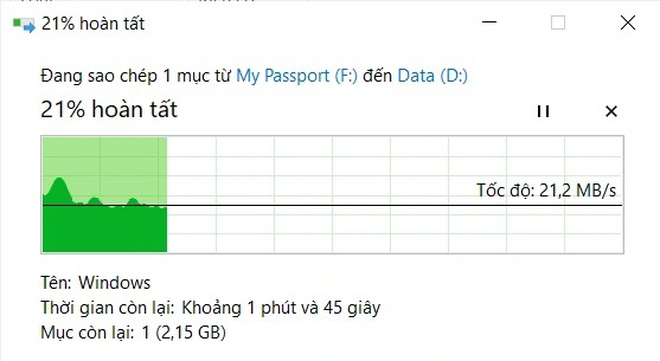
<div style="text-align: center;">Sử dụng chức năng sao chép mặc định của Windows, tốc độ không ổn định và chỉ đạt tốc độ sao chép dữ liệu khoảng 20MB/s.<br />
<br />
<img alt="" height="244" src="https://cm.pek.edu.vn/uploads/news/2021_12/dw2.png" width="660" /><br />
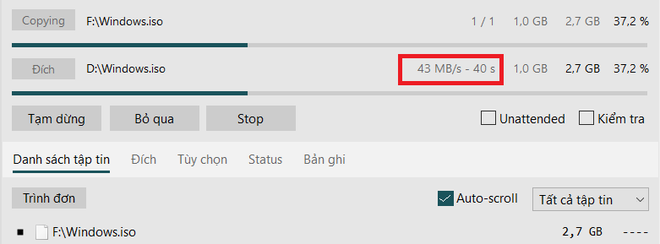
Sao chép cùng một dữ liệu với TeraCopy đạt được tốc độ ổn định hơn và đạt mức 43MB/s.
<p style="text-align: justify;"><br />
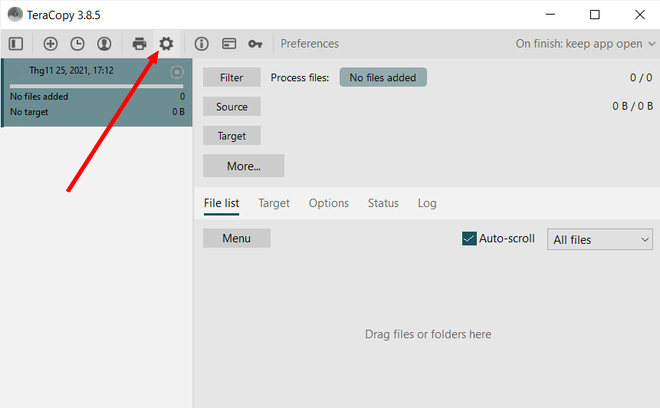
<span style="font-size:16px;">Bạn đọc có thể&nbsp;<a contenteditable="false" href="https://htapp.net/windows/copy-files-faster-and-easier-with-teracopy/" rel="nofollow noopener" target="_blank">download phần mềm miễn phí tại đây</a>&nbsp;(bao gồm cả phiên bản dành cho Windows XP và phiên bản dành cho Windows 7/8/10/11). Phần mềm có hỗ trợ giao diện Việt. Tuy nhiên, mặc định giao diện trên phần mềm sẽ hiển thị bằng tiếng Anh. Để chuyển giao diện phần mềm sang tiếng Việt giúp sử dụng thuận tiện hơn, từ giao diện chính của TeraCopy, bạn nhấn vào nút &quot;Cài đặt&quot; (biểu tượng bánh răng) trên menu của phần mềm.</span></p>
<img alt="" height="408" src="https://cm.pek.edu.vn/uploads/news/2021_12/dw3.png" width="660" />
<p style="text-align: justify;"><br />
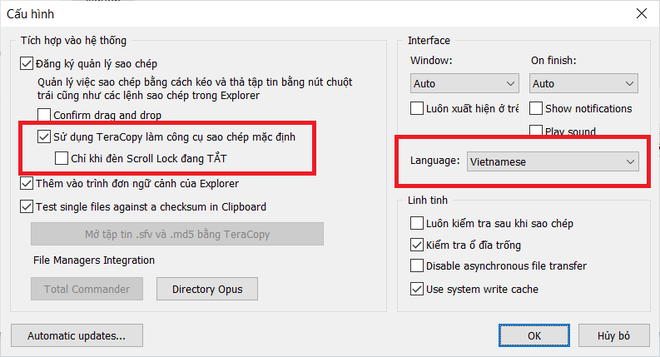
<span style="font-size:16px;">Tại hộp thoại hiện ra, bạn chọn &quot;Vietnamese&quot; ở mục &quot;Language&quot;, lập tức giao diện của phần mềm sẽ được chuyển sang tiếng Việt. Ngoài ra, tại hộp thoại cài đặt này, bạn đánh dấu vào tùy chọn &quot;Sử dụng TeraCopy làm công cụ sao chép mặc định&quot; rồi nhấn &quot;OK&quot; để lưu lại thiết lập.</span></p>

<p><img alt="" height="357" src="https://cm.pek.edu.vn/uploads/news/2021_12/dw4.png" width="660" /></p>

<p style="text-align: justify;"><br />
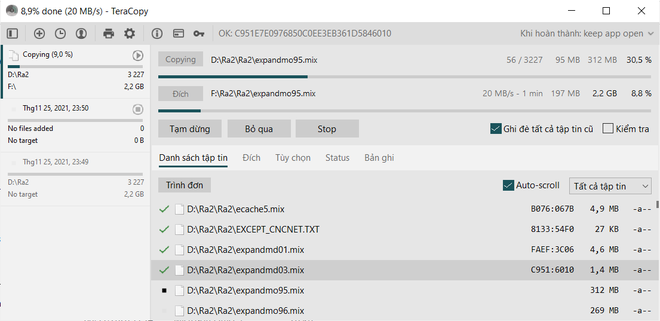
<span style="font-size:16px;">Bây giờ, TeraCopy sẽ thay thế cho chức năng sao chép dữ liệu mặc định trên Windows (bao gồm chức năng copy và cắt/dán file và thư mục). Khi bạn tiến hành di chuyển hoặc sao chép một dữ liệu nào đó, giao diện của TeraCopy sẽ được xuất hiện, hiển thị đầy đủ thông tin chi tiết về quá trình sao chép dữ liệu, như tốc độ sao chép dữ liệu, số file đã được sao chép, có file nào bị lỗi trong quá trình sao chép hay không… nếu xảy ra lỗi trong quá trình sao chép dữ liệu, TeraCopy cũng sẽ cung cấp thông tin lỗi chi tiết, như lỗi do hết dung lượng ổ cứng hay do dữ liệu bị lỗi…</span></p>

<p style="text-align: justify;"><span style="font-size:16px;">Bạn có thể dễ dàng nhận ra tốc độ dữ liệu được sao chép bằng TeraCopy nhanh hơn nhiều lần so với sử dụng chức năng mặc định của Windows.</span></p>

<p><img alt="" height="321" src="https://cm.pek.edu.vn/uploads/news/2021_12/dw5.png" width="660" /></p>

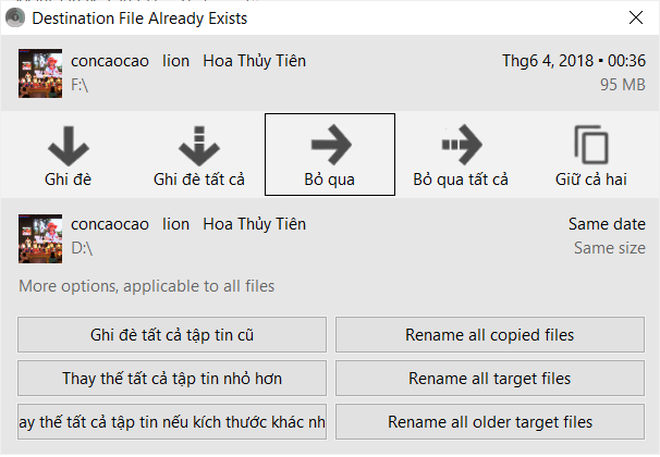
<p style="text-align: justify;"><span style="font-size:16px;">Trong trường hợp file/thư mục được sao chép trùng với các dữ liệu đã có ở thư mục đích, TeraCopy sẽ hiển thị một hộp thoại hỏi ý kiến người dùng xem có muốn ghi đè dữ liệu mới lên dữ liệu cũ hay muốn đổi tên file để không bị trùng lặp. Hộp thoại thông báo do TeraCopy cung cấp khá chi tiết và hoàn toàn bằng tiếng Việt nên bạn có thể dễ dàng có được lựa chọn phù hợp.</span></p>

<div class="image-center"><img alt="" height="457" src="https://cm.pek.edu.vn/uploads/news/2021_12/dw6.png" width="660" /></div>
</div>

<div style="text-align: justify;"><br />
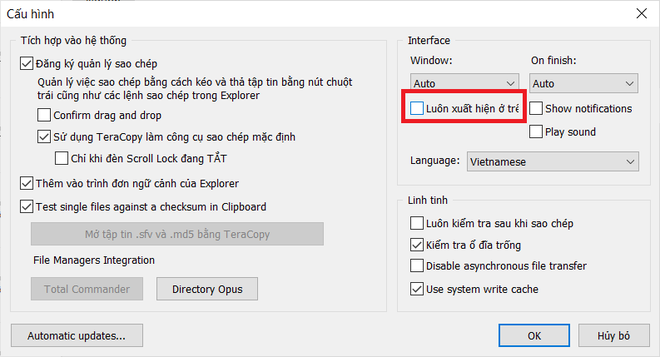
<span style="font-size:16px;">Trong quá trình sao chép/di chuyển dữ liệu, giao diện TeraCopy sẽ ở chế độ luôn hiển thị trên màn hình và che đi giao diện của các phần mềm khác. Điều này sẽ gây bất tiện và khó chịu cho người dùng. Để bỏ chế độ này, bạn truy cập vào mục &quot;Cài đặt&quot; của TeraCopy và đánh dấu bỏ đi tùy chọn &quot;Luôn xuất hiện ở trên cùng&quot;.</span><br />
&nbsp;
<div class="image-center"><img alt="" height="357" src="https://cm.pek.edu.vn/uploads/news/2021_12/dw7.png" width="660" /></div>
<br />
<span style="font-size:16px;">Trong trường hợp không muốn tiếp tục sử dụng chức năng sao chép của TeraCopy và muốn quay lại sử dụng công cụ mặc định của Windows, bạn chỉ việc gỡ bỏ phần mềm TeraCopy ra khỏi máy tính của mình.</span></div>
		</div>
				<div id="author">
						<p>
				<strong>Nguồn tin:</strong>
				dantri.com.vn
			</p>
		</div>
				<div class="copyright">
		</div>
	</div>
	<div id="footer" class="clearfix">
		<div id="url">
			<strong>URL của bản tin này: </strong><a href="https://cm.pek.edu.vn/vi/news/savefile/thong-tin-cong-nghe/thu-thuat-giup-tang-toc-do-sao-chep-du-lieu-tren-may-tinh-244.html" title="Thủ thuật giúp tăng tốc độ sao chép dữ liệu trên máy tính">https://cm.pek.edu.vn/vi/news/savefile/thong-tin-cong-nghe/thu-thuat-giup-tang-toc-do-sao-chep-du-lieu-tren-may-tinh-244.html</a>

		</div>
		<div class="clear"></div>
		<div class="copyright">
			&copy; HỆ THỐNG CHUYÊN MÔN TRƯỜNG PÉTRUS KÝ
		</div>
		<div id="contact">
			<a href="mailto:"></a>
		</div>
	</div>
</div>
        <div id="timeoutsess" class="chromeframe">
            Bạn đã không sử dụng Site, <a onclick="timeoutsesscancel();" href="https://cm.pek.edu.vn/#">Bấm vào đây để duy trì trạng thái đăng nhập</a>. Thời gian chờ: <span id="secField"> 60 </span> giây
        </div>
        <div id="openidResult" class="nv-alert" style="display:none"></div>
        <div id="openidBt" data-result="" data-redirect=""></div>
        <a href="javascript:void(0);" class="scrollup" ><i class="fa fa-arrow-up" aria-hidden="true"></i></a>
<script src="https://cm.pek.edu.vn/assets/js/jquery/jquery.min.js"></script>
<script>
          var txt = "__™(¯`¦ HỆ THỐNG CHUYÊN MÔN TRƯỜNG PÉTRUS KÝ ¦´¯)™__"; // Thay đổi thành tiêu đề của trang web của bạn
            var delay = 100; // Thay đổi giá trị delay tại đây (giá trị tính bằng mili giây)
            var titlePosition = 0; // Vị trí hiện tại của tiêu đề

            function animateTitle() {
                var title = txt.substr(titlePosition) + " " + txt.substr(0, titlePosition); // Tạo chuỗi tiêu đề mới dựa trên vị trí hiện tại
                document.title = title; // Cập nhật tiêu đề trên trình duyệt
                titlePosition = (titlePosition + 1) % txt.length; // Cập nhật vị trí hiện tại của tiêu đề
            }
            setInterval(animateTitle, delay); // Thực hiện cập nhật tiêu đề theo chu kỳ
        </script>
<script>
var nv_base_siteurl="/",nv_lang_data="vi",nv_lang_interface="vi",nv_name_variable="nv",nv_fc_variable="op",nv_lang_variable="language",nv_module_name="news",nv_func_name="savefile",nv_is_user=0, nv_my_ofs=-4,nv_my_abbr="EDT",nv_cookie_prefix="nv4",nv_check_pass_mstime=59878000,nv_area_admin=0,nv_safemode=0,theme_responsive=1,nv_recaptcha_ver=2,nv_recaptcha_sitekey="",nv_recaptcha_type="image",XSSsanitize=0;</script>
<script src="https://cm.pek.edu.vn/assets/js/language/vi.js"></script>
<script src="https://cm.pek.edu.vn/assets/js/global.js"></script>
<script src="https://cm.pek.edu.vn/assets/js/site.js"></script>
<script src="https://cm.pek.edu.vn/themes/default/js/news.js"></script>
<script src="https://cm.pek.edu.vn/themes/default/js/main.js"></script>
<script src="https://cm.pek.edu.vn/themes/default/js/custom.js"></script>
<script type="application/ld+json">
        {
            "@context": "https://schema.org",
            "@type": "Organization",
            "url": "https://cm.pek.edu.vn",
            "logo": "https://cm.pek.edu.vn/uploads/banner-nam-2024.png"
        }
        </script>
<script>
            var isMobile = /iPhone|iPad|iPod|Android/i.test(navigator.userAgent);
            var myAudio = document.getElementById('myAudio');

            if (isMobile) {
                document.addEventListener('touchstart', function() {
            if (myAudio.paused) {
                myAudio.play();
                    }
                });
            } else {
                myAudio.play(); // Phát audio tự động trên máy tính
            }
        </script>
<script async src="https://www.googletagmanager.com/gtag/js?id=G-RPQDS0572Z"></script>
<script>window.dataLayer=window.dataLayer||[];function gtag(){dataLayer.push(arguments)}gtag('js',new Date);gtag('config','G-RPQDS0572Z');</script>
<script src="https://cm.pek.edu.vn/themes/default/js/bootstrap.min.js"></script>
<script type='text/javascript'> 
            $(document).ready(function () {

            $(window).scroll(function () {
                if ($(this).scrollTop() > 100) {
                    $('.scrollup').fadeIn();
                    $('.right-controls').fadeIn();
                } else {
                    $('.scrollup').fadeOut();
                     $('.right-controls').fadeOut();
                }
            });
            $('.scrollup').click(function () {
                $("html, body").animate({
                    scrollTop: 0
                }, 600);
                return false;
            });
        });
        </script>
</body>
</html>