<!DOCTYPE html>
    <html lang="vi" xmlns="http://www.w3.org/1999/xhtml" prefix="og: http://ogp.me/ns#">
    <head>
<title>HỆ THỐNG CHUYÊN MÔN TRƯỜNG PÉTRUS KÝ</title>
<meta name="description" content="Bản quyền phần mềm tăng tốc download dữ liệu từ Internet trị giá 26,95 USD - Savefile - Tin Tức -...">
<meta name="author" content="HỆ THỐNG CHUYÊN MÔN TRƯỜNG PÉTRUS KÝ">
<meta name="copyright" content="HỆ THỐNG CHUYÊN MÔN TRƯỜNG PÉTRUS KÝ []">
<meta name="generator" content="NukeViet v4.5">
<meta name="viewport" content="width=device-width, initial-scale=1">
<meta http-equiv="Content-Type" content="text/html; charset=utf-8">
<meta property="og:title" content="Bản quyền phần mềm tăng tốc download dữ liệu từ Internet trị giá 26,95 USD">
<meta property="og:type" content="website">
<meta property="og:description" content="Savefile - Tin Tức - https&#x3A;&#x002F;&#x002F;cm.pek.edu.vn&#x002F;vi&#x002F;news&#x002F;savefile&#x002F;thong-tin-cong-nghe&#x002F;ban-quyen-phan-mem-tang-toc-download-du-lieu-tu-internet-tri-gia-26-95-usd-220.html">
<meta property="og:site_name" content="HỆ THỐNG CHUYÊN MÔN TRƯỜNG PÉTRUS KÝ">
<meta property="og:url" content="https://cm.pek.edu.vn/vi/news/savefile/thong-tin-cong-nghe/ban-quyen-phan-mem-tang-toc-download-du-lieu-tu-internet-tri-gia-26-95-usd-220.html">
<link rel="shortcut icon" href="https://cm.pek.edu.vn/uploads/favicon.ico">
<link rel="canonical" href="https://cm.pek.edu.vn/vi/news/savefile/thong-tin-cong-nghe/ban-quyen-phan-mem-tang-toc-download-du-lieu-tu-internet-tri-gia-26-95-usd-220.html">
<link rel="alternate" href="https://cm.pek.edu.vn/vi/news/rss/" title="Tin Tức" type="application/rss+xml">
<link rel="alternate" href="https://cm.pek.edu.vn/vi/news/rss/ke-hoach-lam-viec/" title="Tin Tức - Kế hoạch làm việc" type="application/rss+xml">
<link rel="alternate" href="https://cm.pek.edu.vn/vi/news/rss/ke-hoach-lam-viec-tieu-hoc/" title="Tin Tức - Kế hoạch làm việc Tiểu học" type="application/rss+xml">
<link rel="alternate" href="https://cm.pek.edu.vn/vi/news/rss/thong-bao-chuyen-mon/" title="Tin Tức - Thông báo chuyên môn" type="application/rss+xml">
<link rel="alternate" href="https://cm.pek.edu.vn/vi/news/rss/thong-bao-chuyen-mon-tieu-hoc/" title="Tin Tức - Thông báo chuyên môn Tiểu học" type="application/rss+xml">
<link rel="alternate" href="https://cm.pek.edu.vn/vi/news/rss/hoat-dong-chuyen-mon-trai-nghiem/" title="Tin Tức - Hoạt động trải nghiệm-sáng tạo" type="application/rss+xml">
<link rel="alternate" href="https://cm.pek.edu.vn/vi/news/rss/tai-lieu-huong-dan/" title="Tin Tức - Tài liệu hướng dẫn" type="application/rss+xml">
<link rel="alternate" href="https://cm.pek.edu.vn/vi/news/rss/tu-lieu-giao-duc/" title="Tin Tức - Tư liệu giáo dục" type="application/rss+xml">
<link rel="alternate" href="https://cm.pek.edu.vn/vi/news/rss/tai-lieu-giang-day-tap-huan/" title="Tin Tức - Tài liệu giảng dạy-tập huấn" type="application/rss+xml">
<link rel="alternate" href="https://cm.pek.edu.vn/vi/news/rss/de-thi-cap-truong/" title="Tin Tức - Đề thi cấp trường" type="application/rss+xml">
<link rel="alternate" href="https://cm.pek.edu.vn/vi/news/rss/de-thi-nam-2019-2020/" title="Tin Tức - 2019-2020" type="application/rss+xml">
<link rel="alternate" href="https://cm.pek.edu.vn/vi/news/rss/2020-2021/" title="Tin Tức - 2020-2021" type="application/rss+xml">
<link rel="alternate" href="https://cm.pek.edu.vn/vi/news/rss/de-thi-hoc-ky-1/" title="Tin Tức - Đề thi học kỳ 1" type="application/rss+xml">
<link rel="alternate" href="https://cm.pek.edu.vn/vi/news/rss/de-thi-hoc-ky-2/" title="Tin Tức - Đề thi học kỳ 2" type="application/rss+xml">
<link rel="alternate" href="https://cm.pek.edu.vn/vi/news/rss/2021-2022/" title="Tin Tức - 2021-2022" type="application/rss+xml">
<link rel="alternate" href="https://cm.pek.edu.vn/vi/news/rss/de-thi-hsg-cap-huyen-thanh-pho/" title="Tin Tức - Đề thi cấp TP" type="application/rss+xml">
<link rel="alternate" href="https://cm.pek.edu.vn/vi/news/rss/de-thi-cap-tinh-thanh-pho/" title="Tin Tức - Đề thi cấp tỉnh" type="application/rss+xml">
<link rel="alternate" href="https://cm.pek.edu.vn/vi/news/rss/de-thi-cap-quoc-gia/" title="Tin Tức - Đề thi cấp QG" type="application/rss+xml">
<link rel="alternate" href="https://cm.pek.edu.vn/vi/news/rss/van-ban-hanh-chinh/" title="Tin Tức - Văn bản hành chính" type="application/rss+xml">
<link rel="alternate" href="https://cm.pek.edu.vn/vi/news/rss/van-ban-petrus-ky/" title="Tin Tức - Văn bản trường" type="application/rss+xml">
<link rel="alternate" href="https://cm.pek.edu.vn/vi/news/rss/vb-phong-gddt/" title="Tin Tức - Văn bản PGD" type="application/rss+xml">
<link rel="alternate" href="https://cm.pek.edu.vn/vi/news/rss/vb-so-gddt/" title="Tin Tức - Văn bản SGD" type="application/rss+xml">
<link rel="alternate" href="https://cm.pek.edu.vn/vi/news/rss/van-ban-bo-gddt/" title="Tin Tức - VB Bộ GDĐT" type="application/rss+xml">
<link rel="alternate" href="https://cm.pek.edu.vn/vi/news/rss/dien-dan-giao-duc/" title="Tin Tức - Diễn đàn giáo dục" type="application/rss+xml">
<link rel="alternate" href="https://cm.pek.edu.vn/vi/news/rss/infographics/" title="Tin Tức - Infographics" type="application/rss+xml">
<link rel="alternate" href="https://cm.pek.edu.vn/vi/news/rss/thong-tin-cong-nghe/" title="Tin Tức - Thông tin công nghệ" type="application/rss+xml">
<link rel="alternate" href="https://cm.pek.edu.vn/vi/news/rss/bieu-mau-noi-bo/" title="Tin Tức - Biểu mẫu nội bộ" type="application/rss+xml">
<link rel="alternate" href="https://cm.pek.edu.vn/vi/news/rss/phan-mem-bao-mat/" title="Tin Tức - Phần mềm-bảo mật" type="application/rss+xml">
<link rel="alternate" href="https://cm.pek.edu.vn/vi/news/rss/goc-nhin-giao-duc/" title="Tin Tức - Góc nhìn giáo dục" type="application/rss+xml">
<link rel="alternate" href="https://cm.pek.edu.vn/vi/news/rss/thi-tot-nghiep-va-tuyen-sinh/" title="Tin Tức - Thi tốt nghiệp và tuyển sinh" type="application/rss+xml">
<link rel="alternate" href="https://cm.pek.edu.vn/vi/news/rss/tin-tuc-trung-tam/" title="Tin Tức - Tin tức trung tâm Ngoại ngữ" type="application/rss+xml">
<link rel="alternate" href="https://cm.pek.edu.vn/vi/news/rss/bai-tap-online/" title="Tin Tức - Bài tập online" type="application/rss+xml">
<link rel="alternate" href="https://cm.pek.edu.vn/vi/news/rss/khoi-1/" title="Tin Tức - Khối 1" type="application/rss+xml">
<link rel="alternate" href="https://cm.pek.edu.vn/vi/news/rss/toan/" title="Tin Tức - Toán" type="application/rss+xml">
<link rel="alternate" href="https://cm.pek.edu.vn/vi/news/rss/tieng-viet/" title="Tin Tức - Tiếng Việt" type="application/rss+xml">
<link rel="alternate" href="https://cm.pek.edu.vn/vi/news/rss/tieng-anh/" title="Tin Tức - Tiếng Anh" type="application/rss+xml">
<link rel="alternate" href="https://cm.pek.edu.vn/vi/news/rss/khoi-2/" title="Tin Tức - Khối 2" type="application/rss+xml">
<link rel="alternate" href="https://cm.pek.edu.vn/vi/news/rss/toan-45/" title="Tin Tức - Toán" type="application/rss+xml">
<link rel="alternate" href="https://cm.pek.edu.vn/vi/news/rss/tieng-viet-46/" title="Tin Tức - Tiếng Việt" type="application/rss+xml">
<link rel="alternate" href="https://cm.pek.edu.vn/vi/news/rss/tieng-anh-47/" title="Tin Tức - Tiếng Anh" type="application/rss+xml">
<link rel="alternate" href="https://cm.pek.edu.vn/vi/news/rss/khoi-3/" title="Tin Tức - Khối 3" type="application/rss+xml">
<link rel="alternate" href="https://cm.pek.edu.vn/vi/news/rss/toan-48/" title="Tin Tức - Toán" type="application/rss+xml">
<link rel="alternate" href="https://cm.pek.edu.vn/vi/news/rss/tieng-viet-49/" title="Tin Tức - Tiếng Việt" type="application/rss+xml">
<link rel="alternate" href="https://cm.pek.edu.vn/vi/news/rss/tieng-anh-50/" title="Tin Tức - Tiếng Anh" type="application/rss+xml">
<link rel="alternate" href="https://cm.pek.edu.vn/vi/news/rss/khoi-4/" title="Tin Tức - Khối 4" type="application/rss+xml">
<link rel="alternate" href="https://cm.pek.edu.vn/vi/news/rss/toan-51/" title="Tin Tức - Toán" type="application/rss+xml">
<link rel="alternate" href="https://cm.pek.edu.vn/vi/news/rss/tieng-viet-52/" title="Tin Tức - Tiếng Việt" type="application/rss+xml">
<link rel="alternate" href="https://cm.pek.edu.vn/vi/news/rss/tieng-anh-53/" title="Tin Tức - Tiếng Anh" type="application/rss+xml">
<link rel="alternate" href="https://cm.pek.edu.vn/vi/news/rss/khoi-5/" title="Tin Tức - Khối 5" type="application/rss+xml">
<link rel="alternate" href="https://cm.pek.edu.vn/vi/news/rss/toan-54/" title="Tin Tức - Toán" type="application/rss+xml">
<link rel="alternate" href="https://cm.pek.edu.vn/vi/news/rss/tieng-viet-55/" title="Tin Tức - Tiếng Việt" type="application/rss+xml">
<link rel="alternate" href="https://cm.pek.edu.vn/vi/news/rss/tieng-anh-56/" title="Tin Tức - Tiếng Anh" type="application/rss+xml">
<link rel="alternate" href="https://cm.pek.edu.vn/vi/news/rss/khoi-6/" title="Tin Tức - Khối 6" type="application/rss+xml">
<link rel="alternate" href="https://cm.pek.edu.vn/vi/news/rss/toan-6/" title="Tin Tức - Toán 6" type="application/rss+xml">
<link rel="alternate" href="https://cm.pek.edu.vn/vi/news/rss/tieng-anh-6/" title="Tin Tức - Tiếng Anh 6" type="application/rss+xml">
<link rel="alternate" href="https://cm.pek.edu.vn/vi/news/rss/khoi-7/" title="Tin Tức - Khối 7" type="application/rss+xml">
<link rel="alternate" href="https://cm.pek.edu.vn/vi/news/rss/toan-7/" title="Tin Tức - Toán 7" type="application/rss+xml">
<link rel="alternate" href="https://cm.pek.edu.vn/vi/news/rss/tieng-anh-7/" title="Tin Tức - Tiếng Anh 7" type="application/rss+xml">
<link rel="alternate" href="https://cm.pek.edu.vn/vi/news/rss/khoi-8/" title="Tin Tức - Khối 8" type="application/rss+xml">
<link rel="alternate" href="https://cm.pek.edu.vn/vi/news/rss/toan-8/" title="Tin Tức - Toán 8" type="application/rss+xml">
<link rel="alternate" href="https://cm.pek.edu.vn/vi/news/rss/tieng-anh-8/" title="Tin Tức - Tiếng Anh 8" type="application/rss+xml">
<link rel="alternate" href="https://cm.pek.edu.vn/vi/news/rss/khoi-9/" title="Tin Tức - Khối 9" type="application/rss+xml">
<link rel="alternate" href="https://cm.pek.edu.vn/vi/news/rss/toan-9/" title="Tin Tức - Toán 9" type="application/rss+xml">
<link rel="alternate" href="https://cm.pek.edu.vn/vi/news/rss/tieng-anh-9/" title="Tin Tức - Tiếng Anh 9" type="application/rss+xml">
<link rel="alternate" href="https://cm.pek.edu.vn/vi/news/rss/khoi-10/" title="Tin Tức - Khối 10" type="application/rss+xml">
<link rel="alternate" href="https://cm.pek.edu.vn/vi/news/rss/toan-10/" title="Tin Tức - Toán 10" type="application/rss+xml">
<link rel="alternate" href="https://cm.pek.edu.vn/vi/news/rss/tieng-anh-10/" title="Tin Tức - Tiếng Anh 10" type="application/rss+xml">
<link rel="alternate" href="https://cm.pek.edu.vn/vi/news/rss/khoi-11/" title="Tin Tức - Khối 11" type="application/rss+xml">
<link rel="alternate" href="https://cm.pek.edu.vn/vi/news/rss/toan-11/" title="Tin Tức - Toán 11" type="application/rss+xml">
<link rel="alternate" href="https://cm.pek.edu.vn/vi/news/rss/tieng-anh-11/" title="Tin Tức - Tiếng Anh 11" type="application/rss+xml">
<link rel="alternate" href="https://cm.pek.edu.vn/vi/news/rss/khoi-12/" title="Tin Tức - Khối 12" type="application/rss+xml">
<link rel="alternate" href="https://cm.pek.edu.vn/vi/news/rss/toan-12/" title="Tin Tức - Toán 12" type="application/rss+xml">
<link rel="alternate" href="https://cm.pek.edu.vn/vi/news/rss/tieng-anh-12/" title="Tin Tức - Tiếng Anh 12" type="application/rss+xml">
<link rel="preload" as="style" href="https://cm.pek.edu.vn/assets/css/nvgfont.nuosusil.mozilla5.css" type="text/css">
<link rel="preload" as="style" href="https://cm.pek.edu.vn/assets/css/font-awesome.min.css" type="text/css">
<link rel="preload" as="style" href="https://cm.pek.edu.vn/themes/default/css/bootstrap.min.css" type="text/css">
<link rel="preload" as="style" href="https://cm.pek.edu.vn/themes/default/css/style.css" type="text/css">
<link rel="preload" as="style" href="https://cm.pek.edu.vn/themes/default/css/style.responsive.css" type="text/css">
<link rel="preload" as="style" href="https://cm.pek.edu.vn/themes/default/css/news.css" type="text/css">
<link rel="preload" as="style" href="https://cm.pek.edu.vn/themes/default/css/custom.css" type="text/css">
<link rel="preload" as="style" href="https://cm.pek.edu.vn/assets/css/default.vi.0.css" type="text/css">
<link rel="preload" as="script" href="https://cm.pek.edu.vn/assets/js/jquery/jquery.min.js" type="text/javascript">
<link rel="preload" as="script" href="https://cm.pek.edu.vn/assets/js/language/vi.js" type="text/javascript">
<link rel="preload" as="script" href="https://cm.pek.edu.vn/assets/js/global.js" type="text/javascript">
<link rel="preload" as="script" href="https://cm.pek.edu.vn/assets/js/site.js" type="text/javascript">
<link rel="preload" as="script" href="https://cm.pek.edu.vn/themes/default/js/news.js" type="text/javascript">
<link rel="preload" as="script" href="https://cm.pek.edu.vn/themes/default/js/main.js" type="text/javascript">
<link rel="preload" as="script" href="https://cm.pek.edu.vn/themes/default/js/custom.js" type="text/javascript">
<link rel="preload" as="script" href="https://www.googletagmanager.com/gtag/js?id=G-RPQDS0572Z" type="text/javascript">
<link rel="preload" as="script" href="https://cm.pek.edu.vn/themes/default/js/bootstrap.min.js" type="text/javascript">
<link rel="stylesheet" href="https://cm.pek.edu.vn/assets/css/nvgfont.nuosusil.mozilla5.css">
<link rel="stylesheet" href="https://cm.pek.edu.vn/assets/css/font-awesome.min.css">
<link rel="stylesheet" href="https://cm.pek.edu.vn/themes/default/css/bootstrap.min.css">
<link rel="stylesheet" href="https://cm.pek.edu.vn/themes/default/css/style.css">
<link rel="stylesheet" href="https://cm.pek.edu.vn/themes/default/css/style.responsive.css">
<link rel="StyleSheet" href="https://cm.pek.edu.vn/themes/default/css/news.css">
<link rel="stylesheet" href="https://cm.pek.edu.vn/themes/default/css/custom.css">
<link rel="stylesheet" href="https://cm.pek.edu.vn/assets/css/default.vi.0.css">
<style>
	body{background: #fff;}
</style>
        <!-- Doan script cho phep hoat dong tren cac thiet bi di dong -->
</head>
    <iframe src="https://cm.pek.edu.vn/program/hinhhat/demo/index.html" frameborder="0" style="position: fixed; top: 0; left: 0; width: 100%; height: 100%; z-index: -999999;"></iframe>
    <body>
<div id="print">
	<div id="hd_print">
		<h2 class="pull-left">HỆ THỐNG CHUYÊN MÔN TRƯỜNG PÉTRUS KÝ</h2>
		<p class="pull-right"><a title="HỆ THỐNG CHUYÊN MÔN TRƯỜNG PÉTRUS KÝ" href="https://cm.pek.edu.vn/">https://cm.pek.edu.vn</a></p>
	</div>
	<div class="clear"></div>
	<hr />
	<div id="content">
		<h1>Bản quyền phần mềm tăng tốc download dữ liệu từ Internet trị giá 26,95 USD</h1>
		<ul class="list-inline">
			<li>Thứ bảy - 27/11/2021 09:37</li>
			<li class="hidden-print txtrequired"><em class="fa fa-print">&nbsp;</em><a title="In ra" href="javascript:;" onclick="window.print()">In ra</a></li>
			<li class="hidden-print txtrequired"><em class="fa fa-power-off">&nbsp;</em><a title="Đóng cửa sổ này" href="javascript:;" onclick="window.close()">Đóng cửa sổ này</a></li>
		</ul>
		<div class="clear"></div>
		<div id="hometext">
			Phần mềm chuyên nghiệp dưới đây không chỉ giúp bạn tăng tốc độ download dữ liệu từ Internet, mà còn hỗ trợ tải video từ Youtube và nhiều trang web khác.
		</div>
				<div class="imghome">
			<img alt="Bản quyền phần mềm tăng tốc download dữ liệu từ Internet trị giá 26,95 USD" src="https://cm.pek.edu.vn/uploads/news/2021_11/ant-download-manager-pro-cover.jpg" width="850" class="img-thumbnail" />
		</div>
		<div class="clear"></div>
		<div id="bodytext" class="clearfix">
			<p style="text-align: justify;"><span style="font-size:16px;">Nhắc đến các phần mềm hỗ trợ download trên Windows, nhiều người sẽ nghĩ ngay đến Internet Download Manager (IDM), phần mềm hỗ trợ download nổi tiếng nhất hiện nay.</span></p>

<p style="text-align: justify;"><span style="font-size:16px;">Tuy nhiên, giá bản quyền của IDM lại khá đắt, do vậy nhiều người Việt lựa chọn sử dụng phiên bản crack (phiên bản lậu) của IDM, thay vì chi tiền để mua bản quyền của phần mềm, điều này tiềm ẩn nhiều nguy cơ&nbsp;bảo mật&nbsp;và dễ bị nhiễm virus thông qua các bản crack được chia sẻ trên Internet.</span></p>

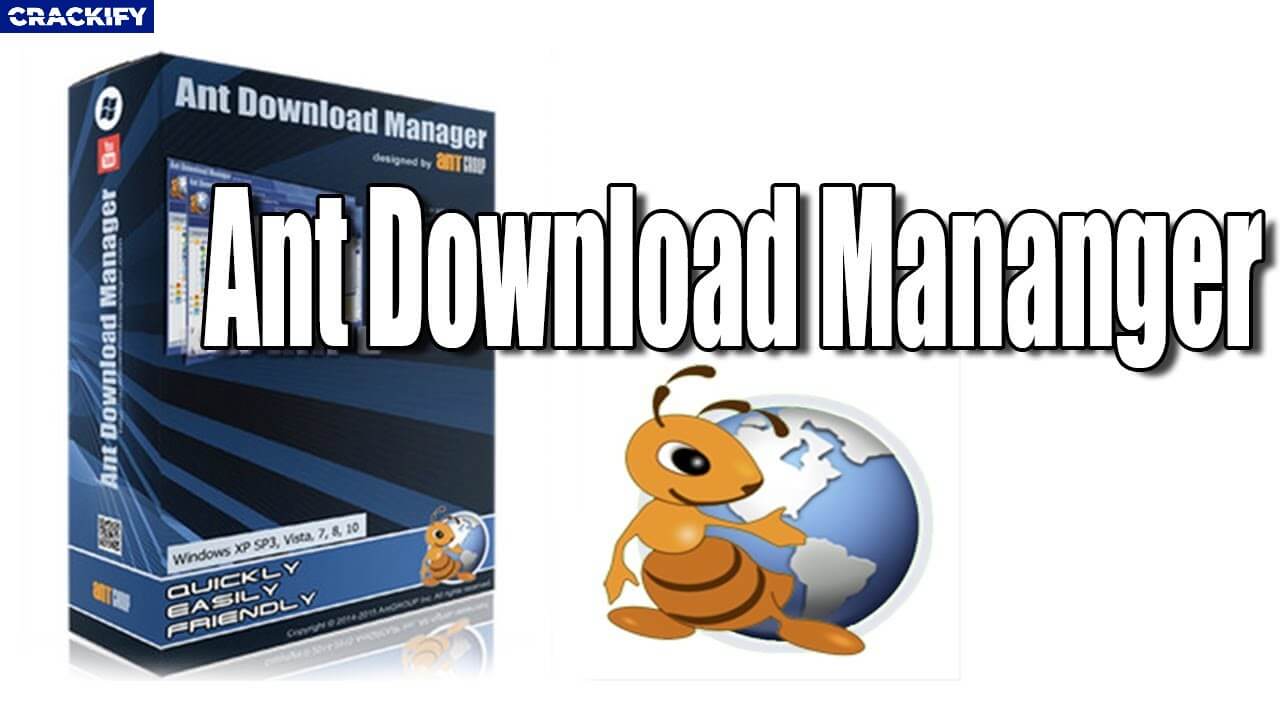
<p style="text-align: justify;"><span style="font-size:16px;">Ngoài IDM, còn rất nhiều phần mềm hỗ trợ download khác mà người dùng có thể sử dụng để giúp tăng tốc độ tải dữ liệu từ Internet về máy tính của mình. Một trong số đó là Ant Download Manager (ADM).</span></p>

<p style="text-align: justify;"><span style="font-size:16px;">Xét về danh tiếng, ADM không thể so với IDM, nhưng về các tính năng, ADM có thể vượt trội hơn so với &quot;đối thủ&quot;. Điểm nhấn ấn tượng nhất của phần mềm là hỗ trợ download dữ liệu theo nhiều giao thức khác nhau, từ HTTP, HTTPS, FTP đến giao thức mạng ngang hàng (P2P)…</span></p>

<p style="text-align: justify;"><span style="font-size:16px;">Đặc biệt, bên cạnh chức năng tăng tốc độ download dữ liệu, ADM còn hỗ trợ download video từ Youtube và các trang web, giúp người dùng dễ dàng tải những đoạn video yêu thích trong khi đang lướt web.</span></p>

<p style="text-align: justify;"><span style="font-size:16px;">Nhìn chung, trong trường hợp bạn không muốn chi tiền để mua bản quyền IDM và lo ngại việc sử dụng phần mềm crack có thể bị nhiễm virus, ADM sẽ là một sự lựa chọn thay thế hoàn toàn phù hợp.</span></p>

<p style="text-align: justify;"><span style="font-size:16px;"><strong>Hướng dẫn download và nhận bản quyền phần mềm</strong></span></p>

<p style="text-align: justify;"><span style="font-size:16px;">Mặc định, ADM chỉ cho phép sử dụng thử trong vòng 30 ngày, sau đó sẽ được chuyển sang phiên bản miễn phí với nhiều tính năng bị hạn chế. Phiên bản chuyên nghiệp của ADM có giá bản quyền 26,95 USD, tuy nhiên, hiện tại AntGroup, nhà phát triển của ADM, đang có chương trình khuyến mãi cho phép người dùng download và sử dụng phần mềm với đầy đủ bản quyền và tính năng.</span></p>

<p style="text-align: justify;"><span style="font-size:16px;">Người dùng có thể thực hiện theo các bước sau để tận dụng chương trình khuyến mãi này:</span></p>

<p style="text-align: justify;"><span style="font-size:16px;">- Đầu tiên, download&nbsp;phiên bản đặc biệt của phần mềm tại đây&nbsp;&nbsp;<a href="https://lichsuvn.net/download/AntDownloadManager_PRO_2.4.2-giveaway.exe"><img alt="download" height="40" src="https://cm.pek.edu.vn/uploads/news/2021_09/download.png" width="144" /></a></span></p>

<p style="text-align: justify;"><span style="font-size:16px;">- Đây là phiên bản khuyến mãi đặc biệt của phần mềm đã được tích hợp sẵn mã bản quyền, do vậy người dùng chỉ việc download và cài đặt lên máy tính để sử dụng mà không cần phải bận tâm đến vấn đề kích hoạt bản quyền.</span></p>

<p style="text-align: justify;"><span style="font-size:16px;">Một nhược điểm của phiên bản khuyến mãi này đó là không hỗ trợ nâng cấp lên phiên bản mới, tuy nhiên, về cơ bản các tính năng của phần mềm cũng đã rất đầy đủ để sử dụng.</span></p>

<p style="text-align: justify;"><span style="font-size:16px;"><em>Lưu ý: Chương trình miễn phí có thể kết thúc trước khi bạn đọc được bài viết này.</em></span></p>

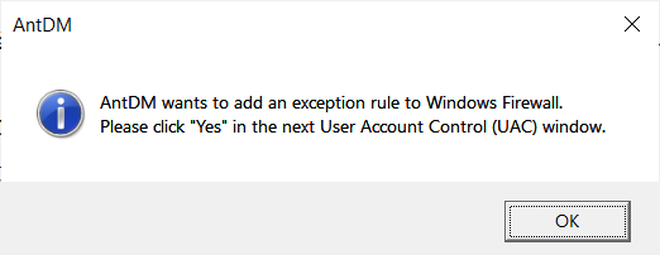
<p style="text-align: justify;"><span style="font-size:16px;">Trong quá trình cài đặt phần mềm, bạn giữ nguyên các thiết lập mặc định. Sau khi hoàn tất cài đặt, nhấn &quot;OK&quot; tại hộp thoại hiện ra (như hình minh họa bên dưới), sau đó khởi động lại máy tính.</span></p>

<div class="image-center"><img alt="" height="255" src="https://cm.pek.edu.vn/uploads/news/2021_11/download-manager-1-1637935730428_1.png" width="660" /></div>

<p style="text-align: justify;"><span style="font-size:16px;"><strong>Hướng dẫn sử dụng phần mềm</strong></span></p>

<p style="text-align: justify;"><span style="font-size:16px;">ADM hỗ trợ tích hợp vào nhiều trình duyệt web khác nhau trên máy tính, như Firefox, Chrome, Microsoft Edge, Opera… để giúp người dùng có thể dễ dàng bắt link và tăng tốc độ download file trong khi đang duyệt web.</span></p>

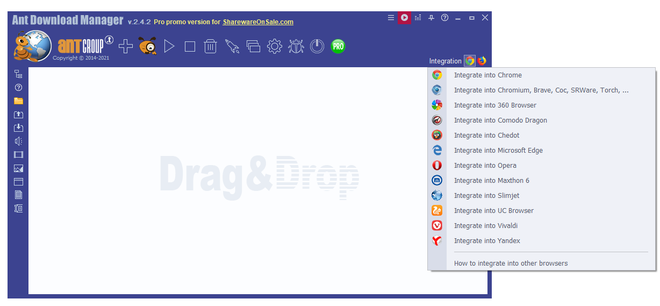
<p style="text-align: justify;"><span style="font-size:16px;">Để tích hợp ADM vào trình duyệt web mà bạn đang sử dụng, từ giao diện chính của phần mềm, nhấn vào biểu tượng trình duyệt web tại mục &quot;Integration&quot; ở góc trên bên phải, sau đó chọn trình duyệt web từ danh sách hiện ra.</span></p>

<div class="image-center"><img alt="" height="306" src="https://cm.pek.edu.vn/uploads/news/2021_11/download-manager-2-1637935730463_1.png" width="660" /></div>

<p style="text-align: justify;"><span style="font-size:16px;">Lập tức, một extension (tiện ích mở rộng) của ADM sẽ được cài đặt lên trình duyệt web tương ứng.</span></p>

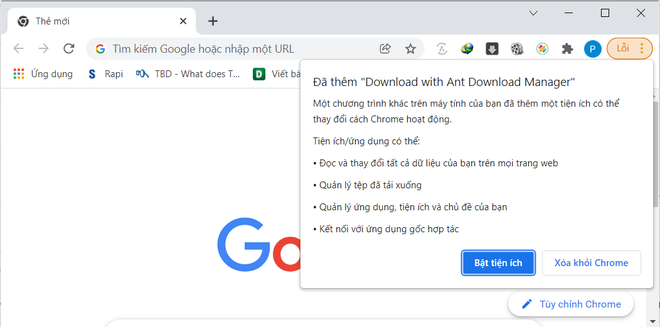
<p style="text-align: justify;"><span style="font-size:16px;">Chẳng hạn trong trường hợp bạn chọn tích hợp ADM vào trình duyệt Chrome, một extension của phần mềm này sẽ tự động được cài đặt trên trình duyệt Chrome. Tại giao diện chính của trình duyệt Chrome, một hộp thoại thông báo cài đặt extension sẽ được hiện ra, bạn nhấn nút &quot;Bật tiện ích&quot; để cài đặt và kích hoạt extension này.</span></p>

<div class="image-center"><img alt="" height="327" src="https://cm.pek.edu.vn/uploads/news/2021_11/download-manager-3-1637935730486.png" width="660" /></div>

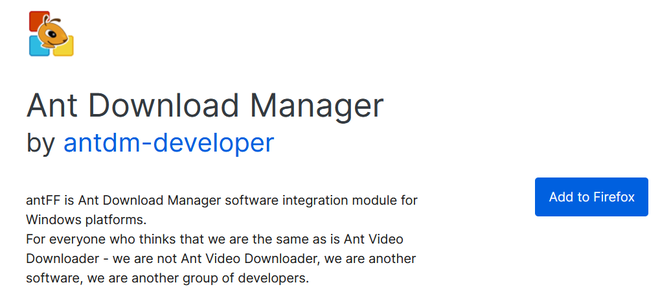
<p style="text-align: justify;"><span style="font-size:16px;">Tương tự, nếu chọn tích hợp ADM vào trình duyệt Firefox, một trang web sẽ được mở ra để người dùng cài đặt extension của ADM lên trình duyệt. Tại đây, bạn nhấn nút &quot;Add to Firefox&quot;, sau đó nhấn tiếp vào nút &quot;Add&quot; từ hộp thoại hiện ra.</span></p>

<div class="image-center"><img alt="" height="298" src="https://cm.pek.edu.vn/uploads/news/2021_11/download-manager-4-1637935730455.png" width="660" /></div>

<p style="text-align: justify;"><span style="font-size:16px;">Như vậy, bạn đã hoàn tất tích hợp phần mềm hỗ trợ download ADM vào các trình duyệt web trên máy tính để sử dụng.</span></p>

<p style="text-align: justify;"><span style="font-size:16px;">Bây giờ, mỗi khi bạn duyệt web và nhấn vào một link nào đó để download dữ liệu, hộp thoại của phần mềm ADM sẽ được hiện ra, cho phép người dùng chọn vị trí để lưu file. Tại hộp thoại này, bạn nhấn nút &quot;Download&quot; để bắt đầu quá trình tải file về máy tính, hoặc &quot;Download Later&quot; để lưu file cần tải vào danh sách chờ trên phần mềm và tiến hành tải về sau.</span></p>

<p style="text-align: justify;"><span style="font-size:16px;">ADM sẽ lưu và phân chia lịch sử dữ liệu download từ Internet thành từng định dạng file riêng biệt, như file video, văn bản, file cài đặt phần mềm hay file nén… giúp người dùng có thể tìm lại những file mà mình đã tải về từ Internet bằng ADM.</span></p>

<p style="text-align: justify;"><span style="font-size:16px;"><strong>Hỗ trợ download video từ Youtube và các trang web</strong></span></p>

<p style="text-align: justify;"><span style="font-size:16px;">Một tính năng rất hữu ích của ADM đó là hỗ trợ download video khi đang duyệt web, bao gồm video từ Youtube và nhiều trang web khác.</span></p>

<p style="text-align: justify;"><span style="font-size:16px;">Để sử dụng tính năng này, bạn chỉ việc chạy nội dung video trên trang web, ADM sẽ tự động bắt đường link của video. Một hộp thoại của ADM sẽ hiển thị gần khung nội dung video trên trang web, bạn chỉ việc nhấn vào biểu tượng dấu mũi tên download ở hộp thoại này, chọn file video cần download để tải về máy tính của mình.<br />
<br />
Chẳng hạn khi xem video từ Youtube, bạn có thể chọn video chuẩn Full HD chất lượng cao (dung lượng lớn) hoặc video chuẩn HD, 480p (có dung lượng nhỏ hơn) để tải về máy. Ngoài ra, ADM còn hỗ trợ người dùng download file từ Youtube thành định dạng mp3, rất hữu ích trong trường hợp bạn muốn tải các video âm nhạc từ Youtube và sử dụng dưới dạng các file mp3.</span></p>

<p style="text-align: justify;"><span style="font-size:16px;"><em>Lưu ý: một số trang web có cơ chế bảo mật không cho phép người dùng download video. Khi gặp những trang web này, tính năng tải video của ADM sẽ không thể hoạt động được.</em></span></p>

<p style="text-align: justify;"><span style="font-size:16px;"><strong>Hỗ trợ download theo giao thức P2P (Peer to Peer)</strong></span></p>

<p style="text-align: justify;"><span style="font-size:16px;">Có lẽ khái niệm download dữ liệu theo giao thức P2P (Peer to peer) đã không còn xa lạ với người sử dụng Internet. Một trong những tính năng nổi bật của ADM đó là cho phép người dùng download các file Torrent. Bạn có thể sử dụng phần mềm này để download dữ liệu theo giao thức P2P đó mà không cần sử dụng đến các phần mềm download torrent chuyên biệt khác.</span></p>

<p style="text-align: justify;"><span style="font-size:16px;">Đây được xem là một tính năng tiện lợi với những ai không muốn cài đặt quá nhiều phần mềm trên máy tính của mình.</span></p>
		</div>
				<div id="author">
						<p>
				<strong>Nguồn tin:</strong>
				dantri.com.vn
			</p>
		</div>
				<div class="copyright">
		</div>
	</div>
	<div id="footer" class="clearfix">
		<div id="url">
			<strong>URL của bản tin này: </strong><a href="https://cm.pek.edu.vn/vi/news/savefile/thong-tin-cong-nghe/ban-quyen-phan-mem-tang-toc-download-du-lieu-tu-internet-tri-gia-26-95-usd-220.html" title="Bản quyền phần mềm tăng tốc download dữ liệu từ Internet trị giá 26,95 USD">https://cm.pek.edu.vn/vi/news/savefile/thong-tin-cong-nghe/ban-quyen-phan-mem-tang-toc-download-du-lieu-tu-internet-tri-gia-26-95-usd-220.html</a>

		</div>
		<div class="clear"></div>
		<div class="copyright">
			&copy; HỆ THỐNG CHUYÊN MÔN TRƯỜNG PÉTRUS KÝ
		</div>
		<div id="contact">
			<a href="mailto:"></a>
		</div>
	</div>
</div>
        <div id="timeoutsess" class="chromeframe">
            Bạn đã không sử dụng Site, <a onclick="timeoutsesscancel();" href="https://cm.pek.edu.vn/#">Bấm vào đây để duy trì trạng thái đăng nhập</a>. Thời gian chờ: <span id="secField"> 60 </span> giây
        </div>
        <div id="openidResult" class="nv-alert" style="display:none"></div>
        <div id="openidBt" data-result="" data-redirect=""></div>
        <a href="javascript:void(0);" class="scrollup" ><i class="fa fa-arrow-up" aria-hidden="true"></i></a>
<script src="https://cm.pek.edu.vn/assets/js/jquery/jquery.min.js"></script>
<script>
          var txt = "__™(¯`¦ HỆ THỐNG CHUYÊN MÔN TRƯỜNG PÉTRUS KÝ ¦´¯)™__"; // Thay đổi thành tiêu đề của trang web của bạn
            var delay = 100; // Thay đổi giá trị delay tại đây (giá trị tính bằng mili giây)
            var titlePosition = 0; // Vị trí hiện tại của tiêu đề

            function animateTitle() {
                var title = txt.substr(titlePosition) + " " + txt.substr(0, titlePosition); // Tạo chuỗi tiêu đề mới dựa trên vị trí hiện tại
                document.title = title; // Cập nhật tiêu đề trên trình duyệt
                titlePosition = (titlePosition + 1) % txt.length; // Cập nhật vị trí hiện tại của tiêu đề
            }
            setInterval(animateTitle, delay); // Thực hiện cập nhật tiêu đề theo chu kỳ
        </script>
<script>
var nv_base_siteurl="/",nv_lang_data="vi",nv_lang_interface="vi",nv_name_variable="nv",nv_fc_variable="op",nv_lang_variable="language",nv_module_name="news",nv_func_name="savefile",nv_is_user=0, nv_my_ofs=-4,nv_my_abbr="EDT",nv_cookie_prefix="nv4",nv_check_pass_mstime=59878000,nv_area_admin=0,nv_safemode=0,theme_responsive=1,nv_recaptcha_ver=2,nv_recaptcha_sitekey="",nv_recaptcha_type="image",XSSsanitize=0;</script>
<script src="https://cm.pek.edu.vn/assets/js/language/vi.js"></script>
<script src="https://cm.pek.edu.vn/assets/js/global.js"></script>
<script src="https://cm.pek.edu.vn/assets/js/site.js"></script>
<script src="https://cm.pek.edu.vn/themes/default/js/news.js"></script>
<script src="https://cm.pek.edu.vn/themes/default/js/main.js"></script>
<script src="https://cm.pek.edu.vn/themes/default/js/custom.js"></script>
<script type="application/ld+json">
        {
            "@context": "https://schema.org",
            "@type": "Organization",
            "url": "https://cm.pek.edu.vn",
            "logo": "https://cm.pek.edu.vn/uploads/banner-nam-2024.png"
        }
        </script>
<script>
            var isMobile = /iPhone|iPad|iPod|Android/i.test(navigator.userAgent);
            var myAudio = document.getElementById('myAudio');

            if (isMobile) {
                document.addEventListener('touchstart', function() {
            if (myAudio.paused) {
                myAudio.play();
                    }
                });
            } else {
                myAudio.play(); // Phát audio tự động trên máy tính
            }
        </script>
<script async src="https://www.googletagmanager.com/gtag/js?id=G-RPQDS0572Z"></script>
<script>window.dataLayer=window.dataLayer||[];function gtag(){dataLayer.push(arguments)}gtag('js',new Date);gtag('config','G-RPQDS0572Z');</script>
<script src="https://cm.pek.edu.vn/themes/default/js/bootstrap.min.js"></script>
<script type='text/javascript'> 
            $(document).ready(function () {

            $(window).scroll(function () {
                if ($(this).scrollTop() > 100) {
                    $('.scrollup').fadeIn();
                    $('.right-controls').fadeIn();
                } else {
                    $('.scrollup').fadeOut();
                     $('.right-controls').fadeOut();
                }
            });
            $('.scrollup').click(function () {
                $("html, body").animate({
                    scrollTop: 0
                }, 600);
                return false;
            });
        });
        </script>
</body>
</html>