<!DOCTYPE html>
    <html lang="vi" xmlns="http://www.w3.org/1999/xhtml" prefix="og: http://ogp.me/ns#">
    <head>
<title>HỆ THỐNG CHUYÊN MÔN TRƯỜNG PÉTRUS KÝ</title>
<meta name="description" content="Bản quyền phần mềm khôi phục dữ liệu bị xóa trên máy tính - Savefile - Tin Tức -...">
<meta name="author" content="HỆ THỐNG CHUYÊN MÔN TRƯỜNG PÉTRUS KÝ">
<meta name="copyright" content="HỆ THỐNG CHUYÊN MÔN TRƯỜNG PÉTRUS KÝ []">
<meta name="generator" content="NukeViet v4.5">
<meta name="viewport" content="width=device-width, initial-scale=1">
<meta http-equiv="Content-Type" content="text/html; charset=utf-8">
<meta property="og:title" content="Bản quyền phần mềm khôi phục dữ liệu bị xóa trên máy tính">
<meta property="og:type" content="website">
<meta property="og:description" content="Savefile - Tin Tức - https&#x3A;&#x002F;&#x002F;cm.pek.edu.vn&#x002F;vi&#x002F;news&#x002F;savefile&#x002F;phan-mem-bao-mat&#x002F;ban-quyen-phan-mem-khoi-phuc-du-lieu-bi-xoa-tren-may-tinh-1010.html">
<meta property="og:site_name" content="HỆ THỐNG CHUYÊN MÔN TRƯỜNG PÉTRUS KÝ">
<meta property="og:url" content="https://cm.pek.edu.vn/vi/news/savefile/phan-mem-bao-mat/ban-quyen-phan-mem-khoi-phuc-du-lieu-bi-xoa-tren-may-tinh-1010.html">
<link rel="shortcut icon" href="https://cm.pek.edu.vn/uploads/favicon.ico">
<link rel="canonical" href="https://cm.pek.edu.vn/vi/news/savefile/phan-mem-bao-mat/ban-quyen-phan-mem-khoi-phuc-du-lieu-bi-xoa-tren-may-tinh-1010.html">
<link rel="alternate" href="https://cm.pek.edu.vn/vi/news/rss/" title="Tin Tức" type="application/rss+xml">
<link rel="alternate" href="https://cm.pek.edu.vn/vi/news/rss/ke-hoach-lam-viec/" title="Tin Tức - Kế hoạch làm việc" type="application/rss+xml">
<link rel="alternate" href="https://cm.pek.edu.vn/vi/news/rss/ke-hoach-lam-viec-tieu-hoc/" title="Tin Tức - Kế hoạch làm việc Tiểu học" type="application/rss+xml">
<link rel="alternate" href="https://cm.pek.edu.vn/vi/news/rss/thong-bao-chuyen-mon/" title="Tin Tức - Thông báo chuyên môn" type="application/rss+xml">
<link rel="alternate" href="https://cm.pek.edu.vn/vi/news/rss/thong-bao-chuyen-mon-tieu-hoc/" title="Tin Tức - Thông báo chuyên môn Tiểu học" type="application/rss+xml">
<link rel="alternate" href="https://cm.pek.edu.vn/vi/news/rss/hoat-dong-chuyen-mon-trai-nghiem/" title="Tin Tức - Hoạt động trải nghiệm-sáng tạo" type="application/rss+xml">
<link rel="alternate" href="https://cm.pek.edu.vn/vi/news/rss/tai-lieu-huong-dan/" title="Tin Tức - Tài liệu hướng dẫn" type="application/rss+xml">
<link rel="alternate" href="https://cm.pek.edu.vn/vi/news/rss/tu-lieu-giao-duc/" title="Tin Tức - Tư liệu giáo dục" type="application/rss+xml">
<link rel="alternate" href="https://cm.pek.edu.vn/vi/news/rss/tai-lieu-giang-day-tap-huan/" title="Tin Tức - Tài liệu giảng dạy-tập huấn" type="application/rss+xml">
<link rel="alternate" href="https://cm.pek.edu.vn/vi/news/rss/de-thi-cap-truong/" title="Tin Tức - Đề thi cấp trường" type="application/rss+xml">
<link rel="alternate" href="https://cm.pek.edu.vn/vi/news/rss/de-thi-nam-2019-2020/" title="Tin Tức - 2019-2020" type="application/rss+xml">
<link rel="alternate" href="https://cm.pek.edu.vn/vi/news/rss/2020-2021/" title="Tin Tức - 2020-2021" type="application/rss+xml">
<link rel="alternate" href="https://cm.pek.edu.vn/vi/news/rss/de-thi-hoc-ky-1/" title="Tin Tức - Đề thi học kỳ 1" type="application/rss+xml">
<link rel="alternate" href="https://cm.pek.edu.vn/vi/news/rss/de-thi-hoc-ky-2/" title="Tin Tức - Đề thi học kỳ 2" type="application/rss+xml">
<link rel="alternate" href="https://cm.pek.edu.vn/vi/news/rss/2021-2022/" title="Tin Tức - 2021-2022" type="application/rss+xml">
<link rel="alternate" href="https://cm.pek.edu.vn/vi/news/rss/de-thi-hsg-cap-huyen-thanh-pho/" title="Tin Tức - Đề thi cấp TP" type="application/rss+xml">
<link rel="alternate" href="https://cm.pek.edu.vn/vi/news/rss/de-thi-cap-tinh-thanh-pho/" title="Tin Tức - Đề thi cấp tỉnh" type="application/rss+xml">
<link rel="alternate" href="https://cm.pek.edu.vn/vi/news/rss/de-thi-cap-quoc-gia/" title="Tin Tức - Đề thi cấp QG" type="application/rss+xml">
<link rel="alternate" href="https://cm.pek.edu.vn/vi/news/rss/van-ban-hanh-chinh/" title="Tin Tức - Văn bản hành chính" type="application/rss+xml">
<link rel="alternate" href="https://cm.pek.edu.vn/vi/news/rss/van-ban-petrus-ky/" title="Tin Tức - Văn bản trường" type="application/rss+xml">
<link rel="alternate" href="https://cm.pek.edu.vn/vi/news/rss/vb-phong-gddt/" title="Tin Tức - Văn bản PGD" type="application/rss+xml">
<link rel="alternate" href="https://cm.pek.edu.vn/vi/news/rss/vb-so-gddt/" title="Tin Tức - Văn bản SGD" type="application/rss+xml">
<link rel="alternate" href="https://cm.pek.edu.vn/vi/news/rss/van-ban-bo-gddt/" title="Tin Tức - VB Bộ GDĐT" type="application/rss+xml">
<link rel="alternate" href="https://cm.pek.edu.vn/vi/news/rss/dien-dan-giao-duc/" title="Tin Tức - Diễn đàn giáo dục" type="application/rss+xml">
<link rel="alternate" href="https://cm.pek.edu.vn/vi/news/rss/infographics/" title="Tin Tức - Infographics" type="application/rss+xml">
<link rel="alternate" href="https://cm.pek.edu.vn/vi/news/rss/thong-tin-cong-nghe/" title="Tin Tức - Thông tin công nghệ" type="application/rss+xml">
<link rel="alternate" href="https://cm.pek.edu.vn/vi/news/rss/bieu-mau-noi-bo/" title="Tin Tức - Biểu mẫu nội bộ" type="application/rss+xml">
<link rel="alternate" href="https://cm.pek.edu.vn/vi/news/rss/phan-mem-bao-mat/" title="Tin Tức - Phần mềm-bảo mật" type="application/rss+xml">
<link rel="alternate" href="https://cm.pek.edu.vn/vi/news/rss/goc-nhin-giao-duc/" title="Tin Tức - Góc nhìn giáo dục" type="application/rss+xml">
<link rel="alternate" href="https://cm.pek.edu.vn/vi/news/rss/thi-tot-nghiep-va-tuyen-sinh/" title="Tin Tức - Thi tốt nghiệp và tuyển sinh" type="application/rss+xml">
<link rel="alternate" href="https://cm.pek.edu.vn/vi/news/rss/tin-tuc-trung-tam/" title="Tin Tức - Tin tức trung tâm Ngoại ngữ" type="application/rss+xml">
<link rel="alternate" href="https://cm.pek.edu.vn/vi/news/rss/bai-tap-online/" title="Tin Tức - Bài tập online" type="application/rss+xml">
<link rel="alternate" href="https://cm.pek.edu.vn/vi/news/rss/khoi-1/" title="Tin Tức - Khối 1" type="application/rss+xml">
<link rel="alternate" href="https://cm.pek.edu.vn/vi/news/rss/toan/" title="Tin Tức - Toán" type="application/rss+xml">
<link rel="alternate" href="https://cm.pek.edu.vn/vi/news/rss/tieng-viet/" title="Tin Tức - Tiếng Việt" type="application/rss+xml">
<link rel="alternate" href="https://cm.pek.edu.vn/vi/news/rss/tieng-anh/" title="Tin Tức - Tiếng Anh" type="application/rss+xml">
<link rel="alternate" href="https://cm.pek.edu.vn/vi/news/rss/khoi-2/" title="Tin Tức - Khối 2" type="application/rss+xml">
<link rel="alternate" href="https://cm.pek.edu.vn/vi/news/rss/toan-45/" title="Tin Tức - Toán" type="application/rss+xml">
<link rel="alternate" href="https://cm.pek.edu.vn/vi/news/rss/tieng-viet-46/" title="Tin Tức - Tiếng Việt" type="application/rss+xml">
<link rel="alternate" href="https://cm.pek.edu.vn/vi/news/rss/tieng-anh-47/" title="Tin Tức - Tiếng Anh" type="application/rss+xml">
<link rel="alternate" href="https://cm.pek.edu.vn/vi/news/rss/khoi-3/" title="Tin Tức - Khối 3" type="application/rss+xml">
<link rel="alternate" href="https://cm.pek.edu.vn/vi/news/rss/toan-48/" title="Tin Tức - Toán" type="application/rss+xml">
<link rel="alternate" href="https://cm.pek.edu.vn/vi/news/rss/tieng-viet-49/" title="Tin Tức - Tiếng Việt" type="application/rss+xml">
<link rel="alternate" href="https://cm.pek.edu.vn/vi/news/rss/tieng-anh-50/" title="Tin Tức - Tiếng Anh" type="application/rss+xml">
<link rel="alternate" href="https://cm.pek.edu.vn/vi/news/rss/khoi-4/" title="Tin Tức - Khối 4" type="application/rss+xml">
<link rel="alternate" href="https://cm.pek.edu.vn/vi/news/rss/toan-51/" title="Tin Tức - Toán" type="application/rss+xml">
<link rel="alternate" href="https://cm.pek.edu.vn/vi/news/rss/tieng-viet-52/" title="Tin Tức - Tiếng Việt" type="application/rss+xml">
<link rel="alternate" href="https://cm.pek.edu.vn/vi/news/rss/tieng-anh-53/" title="Tin Tức - Tiếng Anh" type="application/rss+xml">
<link rel="alternate" href="https://cm.pek.edu.vn/vi/news/rss/khoi-5/" title="Tin Tức - Khối 5" type="application/rss+xml">
<link rel="alternate" href="https://cm.pek.edu.vn/vi/news/rss/toan-54/" title="Tin Tức - Toán" type="application/rss+xml">
<link rel="alternate" href="https://cm.pek.edu.vn/vi/news/rss/tieng-viet-55/" title="Tin Tức - Tiếng Việt" type="application/rss+xml">
<link rel="alternate" href="https://cm.pek.edu.vn/vi/news/rss/tieng-anh-56/" title="Tin Tức - Tiếng Anh" type="application/rss+xml">
<link rel="alternate" href="https://cm.pek.edu.vn/vi/news/rss/khoi-6/" title="Tin Tức - Khối 6" type="application/rss+xml">
<link rel="alternate" href="https://cm.pek.edu.vn/vi/news/rss/toan-6/" title="Tin Tức - Toán 6" type="application/rss+xml">
<link rel="alternate" href="https://cm.pek.edu.vn/vi/news/rss/tieng-anh-6/" title="Tin Tức - Tiếng Anh 6" type="application/rss+xml">
<link rel="alternate" href="https://cm.pek.edu.vn/vi/news/rss/khoi-7/" title="Tin Tức - Khối 7" type="application/rss+xml">
<link rel="alternate" href="https://cm.pek.edu.vn/vi/news/rss/toan-7/" title="Tin Tức - Toán 7" type="application/rss+xml">
<link rel="alternate" href="https://cm.pek.edu.vn/vi/news/rss/tieng-anh-7/" title="Tin Tức - Tiếng Anh 7" type="application/rss+xml">
<link rel="alternate" href="https://cm.pek.edu.vn/vi/news/rss/khoi-8/" title="Tin Tức - Khối 8" type="application/rss+xml">
<link rel="alternate" href="https://cm.pek.edu.vn/vi/news/rss/toan-8/" title="Tin Tức - Toán 8" type="application/rss+xml">
<link rel="alternate" href="https://cm.pek.edu.vn/vi/news/rss/tieng-anh-8/" title="Tin Tức - Tiếng Anh 8" type="application/rss+xml">
<link rel="alternate" href="https://cm.pek.edu.vn/vi/news/rss/khoi-9/" title="Tin Tức - Khối 9" type="application/rss+xml">
<link rel="alternate" href="https://cm.pek.edu.vn/vi/news/rss/toan-9/" title="Tin Tức - Toán 9" type="application/rss+xml">
<link rel="alternate" href="https://cm.pek.edu.vn/vi/news/rss/tieng-anh-9/" title="Tin Tức - Tiếng Anh 9" type="application/rss+xml">
<link rel="alternate" href="https://cm.pek.edu.vn/vi/news/rss/khoi-10/" title="Tin Tức - Khối 10" type="application/rss+xml">
<link rel="alternate" href="https://cm.pek.edu.vn/vi/news/rss/toan-10/" title="Tin Tức - Toán 10" type="application/rss+xml">
<link rel="alternate" href="https://cm.pek.edu.vn/vi/news/rss/tieng-anh-10/" title="Tin Tức - Tiếng Anh 10" type="application/rss+xml">
<link rel="alternate" href="https://cm.pek.edu.vn/vi/news/rss/khoi-11/" title="Tin Tức - Khối 11" type="application/rss+xml">
<link rel="alternate" href="https://cm.pek.edu.vn/vi/news/rss/toan-11/" title="Tin Tức - Toán 11" type="application/rss+xml">
<link rel="alternate" href="https://cm.pek.edu.vn/vi/news/rss/tieng-anh-11/" title="Tin Tức - Tiếng Anh 11" type="application/rss+xml">
<link rel="alternate" href="https://cm.pek.edu.vn/vi/news/rss/khoi-12/" title="Tin Tức - Khối 12" type="application/rss+xml">
<link rel="alternate" href="https://cm.pek.edu.vn/vi/news/rss/toan-12/" title="Tin Tức - Toán 12" type="application/rss+xml">
<link rel="alternate" href="https://cm.pek.edu.vn/vi/news/rss/tieng-anh-12/" title="Tin Tức - Tiếng Anh 12" type="application/rss+xml">
<link rel="preload" as="style" href="https://cm.pek.edu.vn/assets/css/nvgfont.nuosusil.mozilla5.css" type="text/css">
<link rel="preload" as="style" href="https://cm.pek.edu.vn/assets/css/font-awesome.min.css" type="text/css">
<link rel="preload" as="style" href="https://cm.pek.edu.vn/themes/default/css/bootstrap.min.css" type="text/css">
<link rel="preload" as="style" href="https://cm.pek.edu.vn/themes/default/css/style.css" type="text/css">
<link rel="preload" as="style" href="https://cm.pek.edu.vn/themes/default/css/style.responsive.css" type="text/css">
<link rel="preload" as="style" href="https://cm.pek.edu.vn/themes/default/css/news.css" type="text/css">
<link rel="preload" as="style" href="https://cm.pek.edu.vn/themes/default/css/custom.css" type="text/css">
<link rel="preload" as="style" href="https://cm.pek.edu.vn/assets/css/default.vi.0.css" type="text/css">
<link rel="preload" as="script" href="https://cm.pek.edu.vn/assets/js/jquery/jquery.min.js" type="text/javascript">
<link rel="preload" as="script" href="https://cm.pek.edu.vn/assets/js/language/vi.js" type="text/javascript">
<link rel="preload" as="script" href="https://cm.pek.edu.vn/assets/js/global.js" type="text/javascript">
<link rel="preload" as="script" href="https://cm.pek.edu.vn/assets/js/site.js" type="text/javascript">
<link rel="preload" as="script" href="https://cm.pek.edu.vn/themes/default/js/news.js" type="text/javascript">
<link rel="preload" as="script" href="https://cm.pek.edu.vn/themes/default/js/main.js" type="text/javascript">
<link rel="preload" as="script" href="https://cm.pek.edu.vn/themes/default/js/custom.js" type="text/javascript">
<link rel="preload" as="script" href="https://www.googletagmanager.com/gtag/js?id=G-RPQDS0572Z" type="text/javascript">
<link rel="preload" as="script" href="https://cm.pek.edu.vn/themes/default/js/bootstrap.min.js" type="text/javascript">
<link rel="stylesheet" href="https://cm.pek.edu.vn/assets/css/nvgfont.nuosusil.mozilla5.css">
<link rel="stylesheet" href="https://cm.pek.edu.vn/assets/css/font-awesome.min.css">
<link rel="stylesheet" href="https://cm.pek.edu.vn/themes/default/css/bootstrap.min.css">
<link rel="stylesheet" href="https://cm.pek.edu.vn/themes/default/css/style.css">
<link rel="stylesheet" href="https://cm.pek.edu.vn/themes/default/css/style.responsive.css">
<link rel="StyleSheet" href="https://cm.pek.edu.vn/themes/default/css/news.css">
<link rel="stylesheet" href="https://cm.pek.edu.vn/themes/default/css/custom.css">
<link rel="stylesheet" href="https://cm.pek.edu.vn/assets/css/default.vi.0.css">
<style>
	body{background: #fff;}
</style>
        <!-- Doan script cho phep hoat dong tren cac thiet bi di dong -->
</head>
    <iframe src="https://cm.pek.edu.vn/program/hinhhat/demo/index.html" frameborder="0" style="position: fixed; top: 0; left: 0; width: 100%; height: 100%; z-index: -999999;"></iframe>
    <body>
<div id="print">
	<div id="hd_print">
		<h2 class="pull-left">HỆ THỐNG CHUYÊN MÔN TRƯỜNG PÉTRUS KÝ</h2>
		<p class="pull-right"><a title="HỆ THỐNG CHUYÊN MÔN TRƯỜNG PÉTRUS KÝ" href="https://cm.pek.edu.vn/">https://cm.pek.edu.vn</a></p>
	</div>
	<div class="clear"></div>
	<hr />
	<div id="content">
		<h1>Bản quyền phần mềm khôi phục dữ liệu bị xóa trên máy tính</h1>
		<ul class="list-inline">
			<li>Thứ sáu - 17/02/2023 01:53</li>
			<li class="hidden-print txtrequired"><em class="fa fa-print">&nbsp;</em><a title="In ra" href="javascript:;" onclick="window.print()">In ra</a></li>
			<li class="hidden-print txtrequired"><em class="fa fa-power-off">&nbsp;</em><a title="Đóng cửa sổ này" href="javascript:;" onclick="window.close()">Đóng cửa sổ này</a></li>
		</ul>
		<div class="clear"></div>
		<div id="hometext">
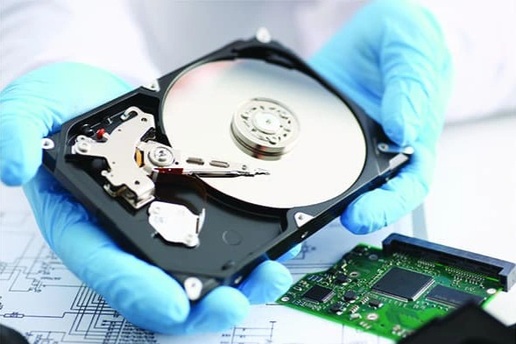
			<div style="text-align: justify;"><span style="color:rgb(0, 51, 0);">Trong trường hợp cần khôi phục những dữ liệu quan trọng trên máy tính bị vô tình xóa nhầm hoặc bị mất do format ổ cứng, phần mềm chuyên nghiệp dưới đây sẽ hữu ích cho bạn.</span></div>
		</div>
				<div class="imghome">
			<img alt="Phần mềm khôi phục dữ liệu bị xóa trên máy tính" src="https://cm.pek.edu.vn/uploads/news/2023_02/khoi-phuc-du-lieu-crop-1644689168350.jpeg" width="850" class="img-thumbnail" />
						<p>
				<em>Phần mềm khôi phục dữ liệu bị xóa trên máy tính</em>
			</p>
		</div>
		<div class="clear"></div>
		<div id="bodytext" class="clearfix">
			<p style="text-align: justify;"><span style="font-size:16px;">Trong quá trình sử dụng máy tính, không ít lần bạn đối mặt với trường hợp vô tình xóa nhầm các file quan trọng hoặc dữ liệu bị &quot;bốc hơi&quot; ngoài ý muốn do format nhầm ổ đĩa hoặc cài đặt lại Windows mà chưa kịp sao lưu dữ liệu… Trong trường hợp cần tìm và khôi phục lại những dữ liệu đã bị xóa trên máy tính, bạn có thể nhờ đến sự giúp đỡ của Aiseesoft Data Recovery.</span></p>

<p style="text-align: justify;"><span style="font-size:16px;">Aiseesoft Data Recovery là một trong những phần mềm khôi phục dữ liệu được đánh giá cao nhất hiện nay về tính hiệu quả. Phần mềm cung cấp nhiều chế độ quét khác nhau giúp người dùng tìm kiếm và khôi phục các dữ liệu bị đã bị mất.</span></p>

<p style="text-align: justify;"><span style="font-size:16px;">Với sự trợ giúp của phần mềm, bạn sẽ có được một giải pháp đề phòng trong trường hợp vô tình xóa nhầm các dữ liệu quan trọng hoặc các dữ liệu biến mất không rõ lý do.</span></p>

<p style="text-align: justify;"><span style="font-size:16px;"><em>Lưu ý: khả năng khôi phục dữ liệu bị mất không đảm bảo 100% và phụ thuộc vào nhiều yếu tố, như dung lượng dữ liệu, thời gian dữ liệu đã bị xóa... Hiện không có bất kỳ phần mềm khôi phục dữ liệu nào có thể đảm bảo tìm kiếm và khôi phục 100% những dữ liệu đã bị xóa trên máy tính.</em></span></p>

<p style="text-align: justify;"><span style="font-size:16px;"><strong>Hướng dẫn các bước đăng ký và nhận bản quyền phần mềm</strong></span></p>

<p style="text-align: justify;"><span style="font-size:16px;">Mặc định, Aiseesoft Data Recovery cho phép sử dụng thử trong vòng 30 ngày và có giá 50 USD cho một năm bản quyền sử dụng hoặc 70 USD cho bản quyền trọn đời. Hiện tại, hãng phần mềm Aiseesoft đang có chương trình khuyến mãi, cung cấp mã bản quyền miễn phí của Aiseesoft Data Recovery hoàn toàn miễn phí.</span></p>

<p style="text-align: justify;"><span style="font-size:16px;">Chương trình khuyến mãi kéo dài đến giữa tháng 3/2023, bạn đọc có thể thực hiện theo các bước sau để tận dụng chương trình khuyến mãi này:</span></p>

<p style="text-align: justify;"><span style="font-size:16px;">- Đầu tiên, bạn&nbsp;<a contenteditable="false" href="https://htapp.net/windows/aiseesoft-data-recovery-recover-all-deleted-data/" rel="nofollow noopener" target="_blank">download bản dùng thử của phần mềm tại đây.</a></span></p>

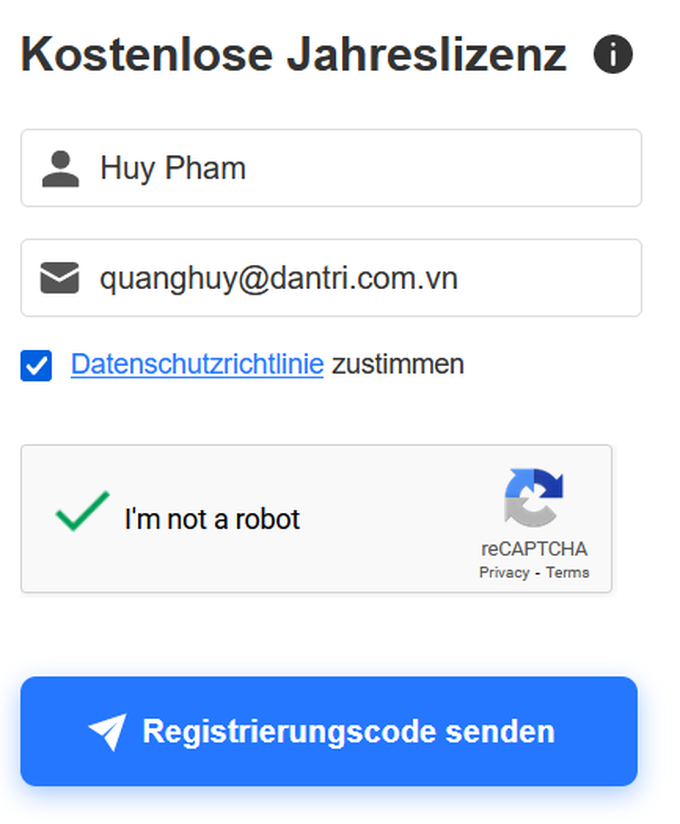
<p style="text-align: justify;"><span style="font-size:16px;">- Tiếp theo, truy cập vào trang web của&nbsp;<a contenteditable="false" href="https://www.aiseesoft.de/support/excel-datei-wiederherstellen/" rel="nofollow noopener" target="_blank">chương trình khuyến mãi tại đây</a>&nbsp;hoặc&nbsp;<a contenteditable="false" href="https://www.aiseesoft.de/tutorial/txt-datei-wiederherstellen/" rel="nofollow noopener" target="_blank">tại đây,</a>&nbsp;điền họ tên, địa chỉ email vào khung tương ứng, đánh dấu đồng ý với các điều khoản sử dụng và đánh dấu tùy chọn &quot;I&#039;m not a robot&quot; ở bên dưới, sau đó nhấn vào nút &quot;Registrierungscode senden&quot;.</span></p>

<figure contenteditable="false"><img alt="Bản quyền phần mềm khôi phục dữ liệu bị xóa trên máy tính, trị giá 50 USD - 1" data-adbro-processed="true" data-content-name="article-content-image" data-content-piece="article-content-image_2351458" data-content-target="/suc-manh-so/ban-quyen-phan-mem-khoi-phuc-du-lieu-bi-xoa-tren-may-tinh-tri-gia-50-usd-20230217003843924.htm" data-height="525" data-original="https://icdn.dantri.com.vn/2023/02/17/khoi-phuc-du-lieu-1-1676568928278.png" data-photo-id="2351458" data-track-content="" data-width="433" src="https://icdn.dantri.com.vn/thumb_w/680/2023/02/17/khoi-phuc-du-lieu-1-1676568928278.png" title="Bản quyền phần mềm khôi phục dữ liệu bị xóa trên máy tính, trị giá 50 USD - 1" /></figure>

<p style="text-align: justify;"><span style="font-size:16px;">- Chờ trong giây lát, một email được gửi đến hộp thư mà bạn đã sử dụng để đăng ký, với tiêu đề: &quot;Aiseesoft Data Recovery&quot;, bên trong có chứa mã bản quyền để kích hoạt phần mềm.</span></p>

<p style="text-align: justify;"><span style="font-size:16px;"><em>&nbsp;Lưu ý: trong trường hợp không nhận được email, bạn hãy thử kiểm tra trong mục &quot;Thư rác&quot; vì có thể hộp thư sẽ lọc nhầm email vào đây.</em></span></p>

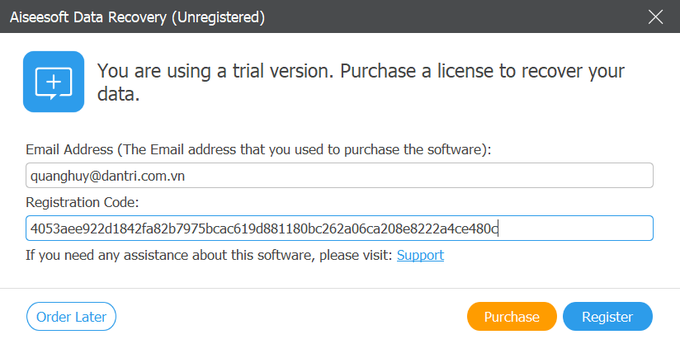
<p style="text-align: justify;"><span style="font-size:16px;">- Trong lần đầu tiên chạy phần mềm, một hộp thoại sẽ hiện ra yêu cầu người dùng kích hoạt bản quyền. Tại đây bạn điền địa chỉ email đã đăng ký ở trên và mã bản quyền nhận được vào khung tương ứng rồi nhấn nút &quot;Register&quot;.</span></p>

<figure contenteditable="false"><img alt="Bản quyền phần mềm khôi phục dữ liệu bị xóa trên máy tính, trị giá 50 USD - 2" data-content-name="article-content-image" data-content-piece="article-content-image_2351456" data-content-target="/suc-manh-so/ban-quyen-phan-mem-khoi-phuc-du-lieu-bi-xoa-tren-may-tinh-tri-gia-50-usd-20230217003843924.htm" data-height="417" data-ll-status="loaded" data-original="https://icdn.dantri.com.vn/2023/02/17/khoi-phuc-du-lieu-2-1676568928255.png" data-photo-id="2351456" data-src="https://icdn.dantri.com.vn/thumb_w/680/2023/02/17/khoi-phuc-du-lieu-2-1676568928255.png" data-track-content="" data-width="824" src="https://icdn.dantri.com.vn/thumb_w/680/2023/02/17/khoi-phuc-du-lieu-2-1676568928255.png" title="Bản quyền phần mềm khôi phục dữ liệu bị xóa trên máy tính, trị giá 50 USD - 2" /></figure>

<p style="text-align: justify;"><span style="font-size:16px;">Như vậy, bạn đã có thể sử dụng phần mềm với đầy đủ bản quyền, không còn bị hạn chế về tính năng.</span></p>

<p style="text-align: justify;"><span style="font-size:16px;"><strong>Hướng dẫn sử dụng phần mềm</strong></span></p>

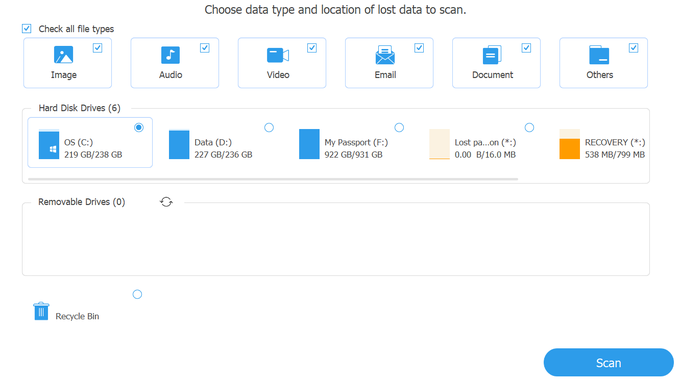
<p style="text-align: justify;"><span style="font-size:16px;">Từ giao diện chính của phần mềm, Aiseesoft Data Recovery sẽ cho phép người dùng chọn định dạng file cần được khôi phục (file ảnh, video, âm thanh, văn bản…) và vị trí chứa file trước khi bị xóa.</span></p>

<p style="text-align: justify;"><span style="font-size:16px;">Trong trường hợp không nhớ cụ thể vị trí chứa file, bạn có thể chọn để quét lần lượt từng phân vùng trên ổ đĩa.</span></p>

<figure contenteditable="false"><img alt="Bản quyền phần mềm khôi phục dữ liệu bị xóa trên máy tính, trị giá 50 USD - 3" data-content-name="article-content-image" data-content-piece="article-content-image_2351457" data-content-target="/suc-manh-so/ban-quyen-phan-mem-khoi-phuc-du-lieu-bi-xoa-tren-may-tinh-tri-gia-50-usd-20230217003843924.htm" data-height="749" data-ll-status="loaded" data-original="https://icdn.dantri.com.vn/2023/02/17/khoi-phuc-du-lieu-3-1676568928260.png" data-photo-id="2351457" data-src="https://icdn.dantri.com.vn/thumb_w/680/2023/02/17/khoi-phuc-du-lieu-3-1676568928260.png" data-track-content="" data-width="1332" src="https://icdn.dantri.com.vn/thumb_w/680/2023/02/17/khoi-phuc-du-lieu-3-1676568928260.png" title="Bản quyền phần mềm khôi phục dữ liệu bị xóa trên máy tính, trị giá 50 USD - 3" /></figure>

<p style="text-align: justify;"><span style="font-size:16px;">Nhấn nút &quot;Scan&quot; trên giao diện chính của phần mềm để bắt đầu quá trình quét và tìm file đã bị xóa theo lựa chọn của người dùng.</span></p>

<p style="text-align: justify;"><span style="font-size:16px;">Sau khi quá trình quét file kết thúc, các file đã bị xóa có thể tìm thấy sẽ được phần mềm liệt kê, phân ra thành từng nhóm định dạng file, chẳng hạn file ảnh, video, văn bản… giúp người dùng có thể tìm thấy file cần khôi phục dễ dàng hơn.</span></p>

<figure contenteditable="false"><img alt="Bản quyền phần mềm khôi phục dữ liệu bị xóa trên máy tính, trị giá 50 USD - 4" data-content-name="article-content-image" data-content-piece="article-content-image_2351455" data-content-target="/suc-manh-so/ban-quyen-phan-mem-khoi-phuc-du-lieu-bi-xoa-tren-may-tinh-tri-gia-50-usd-20230217003843924.htm" data-height="847" data-ll-status="loaded" data-original="https://icdn.dantri.com.vn/2023/02/17/khoi-phuc-du-lieu-4-1676568928223.png" data-photo-id="2351455" data-src="https://icdn.dantri.com.vn/thumb_w/680/2023/02/17/khoi-phuc-du-lieu-4-1676568928223.png" data-track-content="" data-width="1377" src="https://icdn.dantri.com.vn/thumb_w/680/2023/02/17/khoi-phuc-du-lieu-4-1676568928223.png" title="Bản quyền phần mềm khôi phục dữ liệu bị xóa trên máy tính, trị giá 50 USD - 4" /></figure>

<p style="text-align: justify;"><span style="font-size:16px;">Bạn chỉ nên quét và tìm các file bị xóa theo từng định dạng riêng biệt (file ảnh, file video…) để kết quả sau khi quét không quá nhiều và lộn xộn, giúp tìm kiếm file cần khôi phục được dễ dàng và nhanh chóng hơn.</span></p>

<p style="text-align: justify;"><span style="font-size:16px;">Bạn đánh dấu vào các file cần khôi phục có trong danh sách rồi nhấn nút &quot;Recover&quot;.</span></p>

<p style="text-align: justify;"><span style="font-size:16px;">Bước tiếp theo, phần mềm sẽ cho phép người dùng chọn vị trí để lưu file sau khi đã phục hồi. Một điều cần lưu ý, bạn nên chọn phân vùng ổ cứng lưu file phục hồi khác với phân vùng ổ cứng chứa file trước khi xóa, điều này sẽ giúp tăng khả năng phục hồi file đã bị xóa.</span></p>

<p style="text-align: justify;"><span style="font-size:16px;">Chẳng hạn, nếu file cần khôi phục nằm trên ổ đĩa C: trước khi bị xóa, bạn cần phải chọn ổ đĩa D: trên máy tính để lưu file phục hồi.</span></p>

<p style="text-align: justify;"><span style="font-size:16px;">Nhấn &quot;OK&quot; tại hộp thoại chọn vị trí lưu file phục hồi hiện ra. Quá trình phục hồi file bị xóa sẽ được bắt đầu. Quá trình khôi phục diễn ra nhanh hay chậm phụ thuộc vào dung lượng và số lượng file cần khôi phục.</span></p>

<p style="text-align: justify;"><span style="font-size:16px;">Sau khi quá trình hoàn tất, một thư mục mới sẽ được tạo ra tại vị trí bạn đã chọn để lưu file, bên trong có chứa những file đã được phục hồi. Bây giờ, bạn đã lại có thể sử dụng những dữ liệu đã bị xóa mất này.</span></p>

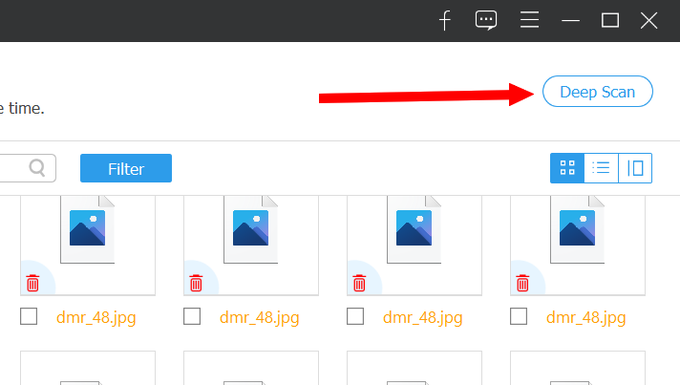
<p style="text-align: justify;"><span style="font-size:16px;">Trong trường hợp Aiseesoft Data Recovery sau khi quét mà không tìm thấy file cần khôi phục, bạn nhấn vào nút &quot;Deep Scan&quot; trên giao diện phần mềm để kích hoạt chế độ quét sâu. Chế độ này sẽ mất nhiều thời gian hơn để quét và tìm dấu vết về các file đã bị xóa, nhưng sẽ tăng khả năng tìm thấy các file đã bị xóa.</span></p>

<figure contenteditable="false"><img alt="Bản quyền phần mềm khôi phục dữ liệu bị xóa trên máy tính, trị giá 50 USD - 5" data-content-name="article-content-image" data-content-piece="article-content-image_2351454" data-content-target="/suc-manh-so/ban-quyen-phan-mem-khoi-phuc-du-lieu-bi-xoa-tren-may-tinh-tri-gia-50-usd-20230217003843924.htm" data-height="403" data-ll-status="loaded" data-original="https://icdn.dantri.com.vn/2023/02/17/khoi-phuc-du-lieu-5-1676568928224.png" data-photo-id="2351454" data-src="https://icdn.dantri.com.vn/thumb_w/680/2023/02/17/khoi-phuc-du-lieu-5-1676568928224.png" data-track-content="" data-width="712" src="https://icdn.dantri.com.vn/thumb_w/680/2023/02/17/khoi-phuc-du-lieu-5-1676568928224.png" title="Bản quyền phần mềm khôi phục dữ liệu bị xóa trên máy tính, trị giá 50 USD - 5" /></figure>

<p style="text-align: justify;"><span style="font-size:16px;">Sau khi hoàn tất quá trình quét sâu, Aiseesoft Data Recovery cũng sẽ liệt kê danh sách những file đã bị xóa có thể khôi phục. Bạn thực hiện lại các bước như đã hướng dẫn ở trên để phục hồi các file cần thiết.</span></p>

<p style="text-align: justify;"><span style="font-size:16px;"><em>Lưu ý: nếu tiến hành khôi phục file càng gần với thời điểm dữ liệu bị xóa hoặc format ổ đĩa, tỉ lệ khôi phục dữ liệu thành công sẽ càng cao.</em></span></p>

<p style="text-align: justify;"><span style="font-size:16px;">Nhìn chung, trong quá trình sử dụng máy tính, chắc hẳn không ai có thể biết trước được khi nào thì mình vô tình xóa nhầm file hoặc vô tình format ổ đĩa làm mất hết toàn bộ dữ liệu chứa trên đó, nhất là trường hợp format nhầm USB hoặc ổ cứng di động. Do vậy, bạn nên tranh thủ cài đặt những phần mềm khôi phục dữ liệu như Aiseesoft Data Recovery để có thể sử dụng ngay khi mình cần.</span></p>
		</div>
				<div id="author">
						<p>
				<strong>Tác giả:</strong>
				Quang Huy
			</p>
						<p>
				<strong>Nguồn tin:</strong>
				dantri.com.vn
			</p>
		</div>
				<div class="copyright">
		</div>
	</div>
	<div id="footer" class="clearfix">
		<div id="url">
			<strong>URL của bản tin này: </strong><a href="https://cm.pek.edu.vn/vi/news/savefile/phan-mem-bao-mat/ban-quyen-phan-mem-khoi-phuc-du-lieu-bi-xoa-tren-may-tinh-1010.html" title="Bản quyền phần mềm khôi phục dữ liệu bị xóa trên máy tính">https://cm.pek.edu.vn/vi/news/savefile/phan-mem-bao-mat/ban-quyen-phan-mem-khoi-phuc-du-lieu-bi-xoa-tren-may-tinh-1010.html</a>

		</div>
		<div class="clear"></div>
		<div class="copyright">
			&copy; HỆ THỐNG CHUYÊN MÔN TRƯỜNG PÉTRUS KÝ
		</div>
		<div id="contact">
			<a href="mailto:"></a>
		</div>
	</div>
</div>
        <div id="timeoutsess" class="chromeframe">
            Bạn đã không sử dụng Site, <a onclick="timeoutsesscancel();" href="https://cm.pek.edu.vn/#">Bấm vào đây để duy trì trạng thái đăng nhập</a>. Thời gian chờ: <span id="secField"> 60 </span> giây
        </div>
        <div id="openidResult" class="nv-alert" style="display:none"></div>
        <div id="openidBt" data-result="" data-redirect=""></div>
        <a href="javascript:void(0);" class="scrollup" ><i class="fa fa-arrow-up" aria-hidden="true"></i></a>
<script src="https://cm.pek.edu.vn/assets/js/jquery/jquery.min.js"></script>
<script>
          var txt = "__™(¯`¦ HỆ THỐNG CHUYÊN MÔN TRƯỜNG PÉTRUS KÝ ¦´¯)™__"; // Thay đổi thành tiêu đề của trang web của bạn
            var delay = 100; // Thay đổi giá trị delay tại đây (giá trị tính bằng mili giây)
            var titlePosition = 0; // Vị trí hiện tại của tiêu đề

            function animateTitle() {
                var title = txt.substr(titlePosition) + " " + txt.substr(0, titlePosition); // Tạo chuỗi tiêu đề mới dựa trên vị trí hiện tại
                document.title = title; // Cập nhật tiêu đề trên trình duyệt
                titlePosition = (titlePosition + 1) % txt.length; // Cập nhật vị trí hiện tại của tiêu đề
            }
            setInterval(animateTitle, delay); // Thực hiện cập nhật tiêu đề theo chu kỳ
        </script>
<script>
var nv_base_siteurl="/",nv_lang_data="vi",nv_lang_interface="vi",nv_name_variable="nv",nv_fc_variable="op",nv_lang_variable="language",nv_module_name="news",nv_func_name="savefile",nv_is_user=0, nv_my_ofs=-4,nv_my_abbr="EDT",nv_cookie_prefix="nv4",nv_check_pass_mstime=59878000,nv_area_admin=0,nv_safemode=0,theme_responsive=1,nv_recaptcha_ver=2,nv_recaptcha_sitekey="",nv_recaptcha_type="image",XSSsanitize=0;</script>
<script src="https://cm.pek.edu.vn/assets/js/language/vi.js"></script>
<script src="https://cm.pek.edu.vn/assets/js/global.js"></script>
<script src="https://cm.pek.edu.vn/assets/js/site.js"></script>
<script src="https://cm.pek.edu.vn/themes/default/js/news.js"></script>
<script src="https://cm.pek.edu.vn/themes/default/js/main.js"></script>
<script src="https://cm.pek.edu.vn/themes/default/js/custom.js"></script>
<script type="application/ld+json">
        {
            "@context": "https://schema.org",
            "@type": "Organization",
            "url": "https://cm.pek.edu.vn",
            "logo": "https://cm.pek.edu.vn/uploads/banner-nam-2024.png"
        }
        </script>
<script>
            var isMobile = /iPhone|iPad|iPod|Android/i.test(navigator.userAgent);
            var myAudio = document.getElementById('myAudio');

            if (isMobile) {
                document.addEventListener('touchstart', function() {
            if (myAudio.paused) {
                myAudio.play();
                    }
                });
            } else {
                myAudio.play(); // Phát audio tự động trên máy tính
            }
        </script>
<script async src="https://www.googletagmanager.com/gtag/js?id=G-RPQDS0572Z"></script>
<script>window.dataLayer=window.dataLayer||[];function gtag(){dataLayer.push(arguments)}gtag('js',new Date);gtag('config','G-RPQDS0572Z');</script>
<script src="https://cm.pek.edu.vn/themes/default/js/bootstrap.min.js"></script>
<script type='text/javascript'> 
            $(document).ready(function () {

            $(window).scroll(function () {
                if ($(this).scrollTop() > 100) {
                    $('.scrollup').fadeIn();
                    $('.right-controls').fadeIn();
                } else {
                    $('.scrollup').fadeOut();
                     $('.right-controls').fadeOut();
                }
            });
            $('.scrollup').click(function () {
                $("html, body").animate({
                    scrollTop: 0
                }, 600);
                return false;
            });
        });
        </script>
</body>
</html>